
Best Food & Drink Apps for iPhone (2026)
Your iPhone is the fastest way to skip a line, snag a reward or lock in a table before the dinner rush. We use these food and drink apps every week, so this is a real shortlist, not a directory dump. We checked ordering speed, how well rewards actually track and whether pickup runs smoothly.
Browse more in our food and drink hub, see the wider best iPhone apps roundup, or compare the iPad picks and Mac picks if you order from the couch.
1. OpenTable
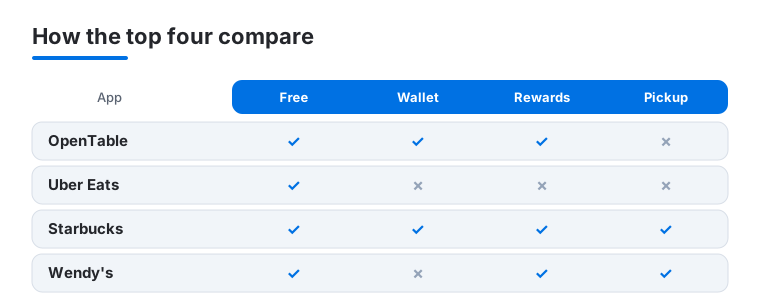
OpenTable is the one we open when we want a table tonight without a phone call. It suits anyone who eats out often, since booking takes about three taps and points quietly add up toward dining rewards. On iPhone the map view feels genuinely native, and you can add a booking to your iOS Calendar so it shows up next to the rest of your day. It is free, and in our testing the reminders kept us from missing a single booking.
2. Uber Eats
When cooking is off the table, Uber Eats is our default for dinner delivered. It fits busy weeknights and anyone juggling a group order, because live map tracking on iPhone tells you exactly when food lands. The app is free, though delivery fees and an optional Uber One membership add up. One detail we like: schedule an order ahead and it arrives right as you walk in.
3. Starbucks
Starbucks earns a spot for sheer daily convenience. Coffee regulars get the most out of it, since mobile order and pay means your drink is waiting when you arrive. On iPhone the Wallet integration and Stars balance on the lock screen widget are quietly excellent. It is free, and rewards stack fast. Customizing a drink down to the syrup pumps was easier here than at the counter.
4. Wendy's
The Wendy's app is built around deals, and that is exactly why we keep it. It suits anyone who likes a cheap weekday lunch, with rotating offers and a points program that nudges you toward free fries. On iPhone, mobile ordering for pickup is quick and the Apple Pay checkout is one tap. It is free. We found the daily offers genuinely worth checking before any drive-through run.
5. KFC
KFC's app is a no fuss way to order a bucket ahead and skip the queue. It works best for family dinners and group meals, letting you customize sides and pay before you leave home. On iPhone the saved order feature means a repeat run takes seconds. It is free to download. One concrete win: scheduling pickup meant our food was hot and bagged the moment we walked in.
6. Panda Express
Panda Express on iPhone is our pick for fast Chinese takeout without the wait. It suits anyone who knows their go to plate, since building a bowl is quick and rewards track every order. The app is free, and points convert to free entrees over time. You can favorite a usual order, so a lunchtime pickup is a couple of taps and an Apple Pay confirmation.
7. Jack in the Box
Jack in the Box is the late night option that actually pays you back. It fits night owls and anyone chasing a deal, with frequent app only offers and a tidy rewards setup. On iPhone, mobile ordering for pickup is smooth and Apple Pay keeps checkout fast. It is free. In our testing, the exclusive in app coupons were noticeably better than what you get ordering at the counter.
8. Olive Garden
For a sit down meal, the Olive Garden app handles waitlist check in and to go orders without a phone call. It suits family dinners and anyone who hates the lobby, since you can join the waitlist from the car. On iPhone the to go ordering flow is clean and Apple Pay works at checkout. It is free, and curbside pickup saved us a wait on a busy Friday.
Food and drink apps for iPhone: three jobs, three kinds of app
Food and drink is one of the busiest corners of the App Store, but almost everything in it does one of three jobs. Knowing which job you actually need is the fastest way to stop installing apps you never open. The three are delivery, recipes and cooking, and restaurant discovery and reservations. Each works differently, and each treats your money and your data differently too.
Delivery: food brought to your door
Delivery apps are the ones that pick up a restaurant order and bring it to you. The widely used choices on iPhone are DoorDash, Uber Eats, Grubhub for prepared meals, and Instacart for groceries. They all do the same core thing: show nearby restaurants or stores, take your order, and track a driver to your door on a live map. DoorDash and Uber Eats tend to have the widest restaurant coverage in most cities, Grubhub overlaps heavily with both, and Instacart is the one to reach for when the order is groceries rather than a cooked meal.
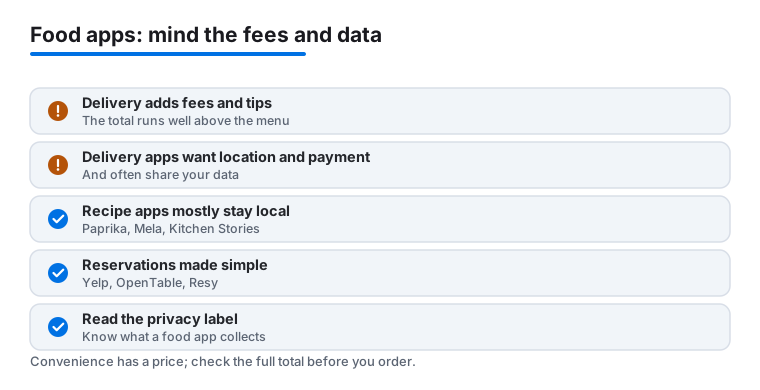
The honest part is the cost. The menu price is rarely what you pay. On top of it you will usually see a service fee, a delivery fee, sometimes a small order fee if your basket is under a threshold, and then a tip for the driver. Menu prices inside delivery apps can also run higher than in the restaurant itself. Added together, a meal that reads as one price on the menu can land well above that at checkout. None of this is hidden, but it is spread across several lines, so it is worth scrolling to the final total before you confirm rather than after.
Memberships such as Uber One or DoorDash DashPass waive some delivery fees for a monthly charge. They only pay off if you order often enough that the saved fees beat the subscription. If you order delivery twice a month, a membership rarely makes sense. It is also worth knowing that a membership usually waives the delivery fee but not the service fee or the tip, so the total stays higher than the menu even with one.
On the data side, delivery apps need your home or current address to route a driver, and a saved payment method to charge the order. Many also share usage data with advertising or analytics partners. That is the trade for the convenience, and it is laid out plainly on each app's App Store listing, so the Privacy Nutrition Label is the place to check before you sign up.
Recipes and cooking: your kitchen, organized
Recipe apps are a calmer category. They help you save recipes, plan meals, build a shopping list, and follow steps while you cook. Strong iPhone options include Paprika, which clips recipes from websites and syncs them to your own account, Mela, which is built around a clean reader and your saved sources, and Kitchen Stories, which leans on guided, step by step recipes with photos.
The good news on privacy is that this category is usually the gentlest. Many recipe apps keep your data on the device or sync it only to your own iCloud or app account, rather than sharing it widely. There is no driver to locate and no restaurant to bill, so there is far less reason for these apps to collect location or share data with third parties. That said, the picture varies by app, so it is still worth a glance at the Privacy Nutrition Label before you commit your whole recipe box to one.
When you choose a recipe app, the question that matters most is how it stores your collection. Some keep everything in their own account, some sync through your iCloud, and a few stay entirely on the one device. Each is fine, but they behave differently if you switch phones or want the same recipes on an iPad, so it is worth picking the model that matches how you actually cook before you build up years of saved meals inside it.
Restaurant discovery and reservations: finding and booking a table
The third job is finding somewhere to eat and locking in a table. Yelp is the broad discovery app, with reviews, photos and hours. OpenTable and Resy are the booking apps: they show real time table availability and let you reserve in a few taps, then let you add the booking to your iOS Calendar and send a reminder so you have it before you head out. OpenTable also runs a points program for frequent diners.
These apps need your location to show nearby results, and the booking apps store a payment method to hold or guarantee some reservations. That is normal for what they do, but it is another reason to read the privacy details rather than assume.
How to choose the right one
Start from the job you do most, not from the longest feature list:
- If you mostly order in, pick one delivery app that covers your neighborhood well and learn its fee structure. Adding a second only helps if it carries restaurants the first does not.
- If you mostly cook, choose a recipe app whose syncing matches how you live: a single phone, or your own iCloud account across devices. This is where your data stays closest to you.
- If you mostly eat out, keep one discovery app for finding places and one reservations app for booking. Many people are happy with Yelp plus OpenTable.
There is no harm in keeping one of each: a delivery app for the nights you cannot cook, a recipe app for the nights you can, and a reservations app for going out. The trap is installing five apps that all do the same job.
A short, honest checklist on fees and privacy
- Read the final total, not the menu price. In delivery apps, service, delivery and small order fees plus the tip can push the total far above what the dish costs in the restaurant.
- Decide on memberships with math. A fee waiving subscription only saves money if your order count is high enough to clear its monthly cost.
- Check the Privacy Nutrition Label. On every app's App Store page, this section shows what data is collected and whether it is linked to you or used to track you. Delivery and discovery apps need location and payment and often share data with third parties, so this is where to look before you tap install.
- Favor local for recipes. If keeping your data close matters to you, recipe apps that store on device or sync only to your own account are the safest of the three jobs.
Frequently asked questions
Which app is best for restaurant reservations on iPhone?
OpenTable is our top pick for booking a table. It has the widest restaurant coverage, lets you reserve in a few taps and can add the reservation to your iOS Calendar with a reminder. The free dining points are a nice bonus if you book often.
Are these food apps free to use?
Yes, every app here is free to download and use. You pay only for your food. Delivery apps like Uber Eats add service and delivery fees, and some offer a paid membership that waives them if you order a lot.
Do fast food apps actually save money?
In our experience, yes. Chains like Wendy's, Jack in the Box and KFC push app only deals and loyalty points you simply do not get at the counter. We found it worth checking the offers tab before any order.
Can I use Apple Pay in these apps?
The apps that take payment, meaning the delivery and order ahead picks like Uber Eats, Starbucks, Wendy's and KFC, generally support Apple Pay at checkout, so you can confirm with Face ID and no typing. Reservation apps like OpenTable are for booking a table, not paying for the meal, so you settle the bill at the restaurant. Starbucks also adds order details to Apple Wallet, while OpenTable keeps your booking in the app and can add it to your iOS Calendar.
Why is my delivery total higher than the menu price?
Delivery apps add charges on top of the food. You will usually see a service fee, a delivery fee, sometimes a small order fee, and a tip for the driver, and menu prices inside the app can run higher than in the restaurant. It helps to scroll to the final total before you confirm rather than judging by the menu price alone.
Do recipe apps collect less of my data than delivery apps?
Usually, yes. Recipe apps like Paprika and Mela often keep your data on the device or sync it only to your own account, with no driver to locate and no payment to process. Delivery and reservations apps need location and payment to work. Either way, the Privacy Nutrition Label on each app's App Store page is the place to confirm what is collected.