
Best Food & Drink Apps for Mac (2026)
A Mac is not the first thing you reach for when hunger hits, but it turns out to be a calm place to plan a grocery haul, build a big group order, or read restaurant reviews without squinting. We spent a couple of weeks ordering dinner, stocking the fridge, and hunting rewards from a laptop to see which apps hold up on a big screen and which ones clearly still want your phone. Below are the ones we actually kept open, with notes on free versus paid and how each feels day to day. For more, browse the wider Food and Drink hub or our full roundup of the best Mac apps.
1. Domino's
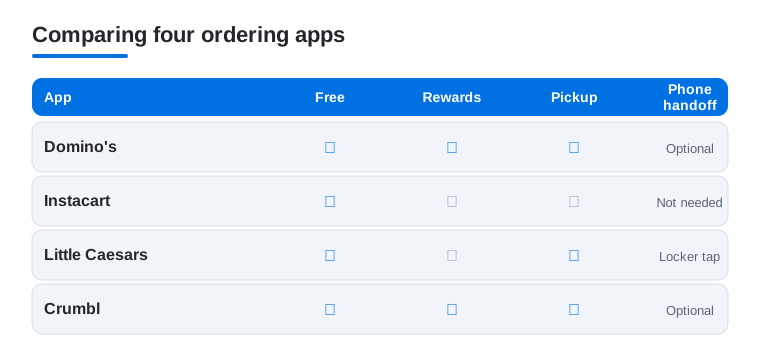
Building a pizza on a Mac is genuinely nicer than thumbing through it on a phone. We loved laying out a big group order in the visual pizza builder and watching the famous order tracker from across the room. It is free, and you only pay for the food. Domino's Rewards, the Piece of the Pie loyalty program, earns points toward free pizza as you order. In our testing, a saved Easy Order turned the repeat Friday night order into a two click job.
2. Instacart
Instacart is the app we reached for most on the Mac, because a full grocery shop is just easier with a keyboard and a wide screen. We filled a week of groceries far faster than tapping on a phone. It is free, with delivery fees per order or a yearly Instacart Plus plan if you shop often. Browsing weekly deals across several stores at once was the real time saver.
3. Kroger
If Kroger is your store, its app on a Mac is a quietly useful coupon and pickup planner. We clipped digital coupons, built a cart for curbside pickup, and skimmed the weekly ad with room to actually read it. It is free, and savings stack with your loyalty card. Loading a pile of coupons before a pickup run was far less fiddly on a laptop than in the parking lot.
4. Little Caesars
Little Caesars keeps it refreshingly simple, and that suits a quick Mac order well. We reserved a Hot-N-Ready for pickup and skipped the line, all from a browser tab while working. It is free, and the in-app Challenges program lets you complete set tasks, like ordering a specific item or a number of times, to unlock a free item. The standout was Pizza Portal pickup, where your order waits in a heated locker and you tap your phone to open it.
5. Yelp
Yelp is at its best on a Mac, where reading reviews and comparing spots feels like proper research instead of a tiny scroll. We planned a night out by opening menus, photos, and reviews in tabs, then booked a table without leaving the page. It is free to browse and book. The big screen made it easy to tell a genuinely great local place from one coasting on old reviews.
6. Crumbl
Crumbl is a pure weekend treat, and checking the rotating weekly flavor lineup on a Mac is oddly satisfying. We previewed the four rotating weekly flavors (alongside six classic cookies), placed a pickup order, and tracked points without the phone. It is free, and you pay per box. Deciding as a household worked better on a laptop, since everyone could crowd the screen and argue over the flavors first.
7. Dutch Bros
Dutch Bros fans mostly live in the phone app at the drive thru, but the Mac is a fine spot to plan ahead. We browsed the sprawling drink menu, checked Dutch Rewards points, and reloaded the balance before heading out. It is free, and points add up toward free drinks. The menu, which is huge once you count the secret combinations, is far easier to read on a bigger screen.
8. cooking apps
Once the groceries arrive, cooking apps are where a Mac truly earns its spot on the counter. We propped the laptop up, followed step by step recipes, and watched technique videos without a screen that dims mid stir. Most have a free tier, with paid plans unlocking bigger recipe libraries and meal planning. A wide screen meant we saw the whole ingredient list and method at once, no scrolling.
Food and drink on a Mac: plan here, order on your phone
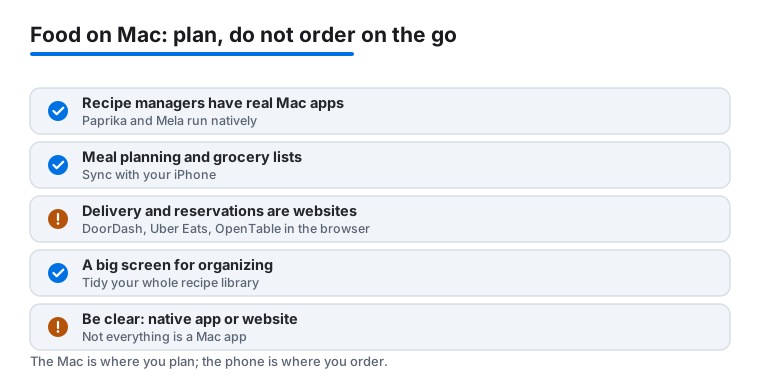
It helps to be honest about what a Mac is good for in the kitchen. It is not the device you grab when you are hungry on the bus or standing at a drive thru. It is a calm, wide screen for the slow parts: deciding what to cook this week, building a grocery list, saving recipes you actually want to make again. Once it is time to pay a driver or scan a pickup code, your phone takes over. If you sort your apps along that line, planning on the Mac and ordering or collecting on the phone, the whole setup feels less cluttered and you stop fighting tools that were never built for a laptop.
Where the Mac genuinely shines: recipes and meal planning
This is the part most people skip, and it is the part the Mac does best. Recipe management and meal planning reward a big screen, a keyboard, and a window you can leave open while you cook. Better still, there are real native Mac apps for this, not just websites in a browser tab.
- Paprika is a native Mac app (sold through the Mac App Store) that saves recipes from the web, strips out the clutter, and builds a grocery list from whatever you plan to cook. It syncs with its own iPhone and iPad apps, so the recipe you saved on the laptop is in your hand at the store.
- Mela is another native Mac app, also with iPhone and iPad versions, built around saving recipes and following them step by step. It leans on a clean reading view and a cook mode that keeps the screen awake while you work, which matters more than it sounds when your hands are messy.
The point is not which one you pick. It is that a recipe manager that syncs with your iPhone is the single most useful food tool you can put on a Mac. You do the gathering and planning on the big screen, where reading and editing are comfortable, and the same content rides along to the phone or iPad in the kitchen. When you are weighing one against another, a few honest questions help:
- Does the sync actually work both ways, for free? Some apps sync over iCloud at no extra cost, others run a paid service. Either can be fine, but know which one you are signing up for before you build a whole recipe library inside it.
- Can it import from a web page cleanly? The real test is pasting in a link to a recipe you found and getting back just the ingredients and steps, without the long story above them. The good ones do this on the Mac in a second or two.
- Does it build a grocery list you can take with you? A planner that turns this week's chosen meals into one combined shopping list, then shows that list on your phone at the store, saves the most time of all.
Groceries and meal planning: a list that follows you
The second job worth setting up is the weekly shop. A good recipe manager already turns planned meals into a grocery list, but you can also use a store or delivery service for the actual buying. Here it pays to be clear about what is what:
- Instacart and most supermarket services (for example Kroger) are used on a Mac through the browser. They do not ship native Mac apps, and that is fine. A full cart is genuinely faster to build with a keyboard and a wide window than by tapping a phone, and clipping a stack of coupons before a pickup run is far less fiddly on a laptop.
- Build the cart on the Mac, then let the phone handle the live order: driver updates, last minute swaps, and the knock at the door all happen better on the device in your pocket.
If you want one tidy flow, plan meals in a native recipe app, push the generated list to your phone, and shop either in a store browser tab or from the list itself. You are not forcing anything onto the Mac that does not belong there.
Delivery and reservations: honestly, use the browser
This is where the honest framing matters most. The big delivery and booking services do not make native Mac apps. DoorDash, Uber Eats, and OpenTable are all used on a Mac through a web browser, by going to their websites. There is nothing wrong with that. Reading a long menu, comparing restaurants, or scanning open reservation times is comfortable on a big screen. But you are using a website, not installing an app, and it is worth knowing the difference so you are not hunting the Mac App Store for something that was never there.
A few practical notes for the browser side:
- Sign in once and let the browser remember you, but treat payment details with the same care you would on any site. If a deal or a link looks off, slow down before you enter a card.
- Reservations on a site like OpenTable finish fine in the browser. On the go changes, like running late, are easier to handle from the phone app later.
- Pickup perks that scan a code, such as a heated locker or a drive thru reward, always finish on the phone no matter where you started the order.
How to choose your setup
Put together, a sensible Mac food and drink setup is short:
- A recipe manager that syncs with your iPhone. Pick a native Mac app like Paprika or Mela so saving, editing, and planning are comfortable, and the recipes follow you to the kitchen.
- A grocery and meal planner. Let the recipe app generate the list, or use a store service in the browser to build and schedule the shop.
- A browser for ordering. Keep DoorDash, Uber Eats, and OpenTable as bookmarks, not as a search through the App Store. Plan and read on the Mac, then pay or collect on the phone.
That split, native apps for the parts you keep and revisit, the browser for the parts you do once and move on, is the whole trick to using a Mac for food and drink without frustration.
Frequently asked questions
Can I actually order food from a Mac, or do I need my phone?
You can order plenty straight from a Mac. Many services like Instacart, DoorDash, Uber Eats, and OpenTable run in a web browser, which is great for building big orders and reading reviews. The catch is pickup perks that scan your phone, like Little Caesars Pizza Portal or a Dutch Bros code, still want the phone at the counter. We plan on the Mac, then finish on the phone.
Are these food and drink apps free?
Yes, every app here is free to download and use. You only pay for the food, plus the usual delivery or service fees on orders. A few offer optional memberships, like Instacart Plus for cheaper delivery, but none are required. Rewards and in-app challenges from Domino's, Little Caesars, Kroger, Crumbl, and Dutch Bros cost nothing and quietly save you money the more you order.
Why bother with these on a Mac instead of just my phone?
Comfort and clarity. Filling a weekly grocery cart, comparing restaurants, or clipping a pile of coupons is simply faster on a big screen with a keyboard. We found anything involving a lot of reading or a long order goes quicker on a Mac, while quick taps at a drive thru still belong on a phone. Most people happily use both depending on the task.
Which food picks are real Mac apps and which are just websites?
Recipe managers are where native Mac apps live. Paprika and Mela both have real Mac apps that sync with their iPhone and iPad versions. The big delivery and booking services do not make Mac apps at all, so DoorDash, Uber Eats, and OpenTable are used through a web browser by visiting their websites. Grocery services like Instacart and Kroger are also browser based on a Mac. None of that is a downside, but it helps to know what you are installing versus what you are simply opening in a tab.
What other Apple devices pair well with these apps?
An iPhone is the natural partner, since pickup codes and on the go ordering live there. An iPad sits nicely in between, giving you a touch screen with more room, which is lovely propped up in the kitchen. See our guides to the best food and drink apps for iPhone and the best food and drink apps for iPad to round out your setup.