
Best Music & Audio Apps for Mac (2026)
A Mac makes a wonderful little music room once you fill the dock with the right apps. We spent a few weeks streaming, recording demos, editing podcasts, and tuning a guitar across an M series MacBook to see what feels good in daily use. This is the listening and recording corner of our wider music and audio guides, and it sits next to the rest of our best Mac apps. Picks are ordered best first, with a note on free versus paid for each.
1. Apple Music
Apple Music is the most natural place to start on a Mac because it is already there, built into the Music app and tied to your library. Lossless and Spatial Audio sound genuinely good through decent headphones, and Siri requests just work. It costs about 11 dollars a month after a free trial. We loved how a song started on the iPhone picked up instantly here.
2. SoundCloud
SoundCloud is where we go on the Mac to hear things the big services do not carry, from bedroom producers to early remixes and DJ sets. The web player runs cleanly in any browser and it holds a huge catalog of independent uploads. It is free with ads, or a few dollars a month removes them. If you follow underground artists, this stays open all day.
3. GarageBand
GarageBand is the free recording studio Apple hands every Mac owner, and it is far more capable than its friendly face suggests. Plug in a guitar or mic, pick from the built in drummers and loops, and you can sketch a full song in an afternoon. It costs nothing and the included instruments sound great. We tracked vocals over a loop and the latency was low enough to feel live.
4. Amazon Music
Amazon Music makes the most sense on a Mac if you already pay for Prime, since a sizable catalog comes bundled free. The desktop app is tidy, the HD and Ultra HD tiers sound excellent, and it pairs effortlessly with any Echo speakers. Prime members get a rotating library, with Unlimited about 13 dollars monthly, or 11.99 with Prime, for everything. Handing playback to a kitchen Echo worked without fuss.
5. Apple Podcasts
Apple Podcasts is the no fuss way to keep up with shows on a Mac, with your subscriptions synced from every device. Speed control, a sleep timer, and silence skipping are built in, and new episodes download quietly in the background. It is free, with optional paid subscriptions for some shows. We like pairing it with our Mac streaming apps for a full media setup.
6. Spotify
Spotify remains the streaming app most friends actually use, and its Mac app is fast, stable, and full of the best playlists and discovery tools. Connect lets you fling playback to a phone or speaker mid song, and Wrapped is half the fun. It is free with ads, or Premium runs about 13 dollars a month. The Daylist kept surprising us with the right track.
7. Logic Pro
Logic Pro is the step up for anyone who outgrows GarageBand, and projects move between them without friction. It is a proper professional studio with deep synths, mixing tools, and a huge sound library, tuned for Apple silicon so big sessions stay smooth. It is a one time purchase at 199.99 dollars on the Mac App Store. Apple ended the standalone 90 day Logic Pro trial in January 2026, so trial access now comes only through the Apple Creator Studio subscription. We opened a heavy multitrack on a MacBook Air and it never stuttered.
8. djay Pro
djay Pro turns a Mac into a credible DJ rig, hooking straight into your Apple Music and Spotify libraries so you mix tracks you already love. The waveforms are clear, the automatic beatmatching is reliable, and it supports most popular controllers. There is a capable free tier, with a subscription for the pro features. We mixed a short set on the trackpad alone and it held the beat.
9. Audacity
Audacity is the free, open source audio editor we still reach for when a podcast or voice recording needs cleaning up. It records, trims, removes background hiss, and exports MP3s for free, and the Mac build runs fine on Apple silicon. It is plain to look at but endlessly useful. We cut and de noised a half hour interview in it without a hitch.
10. MuseScore
MuseScore is a free, open source native Mac app for writing and reading sheet music, and it runs on both Apple silicon and Intel Macs. You can enter notes by clicking the staff or playing a MIDI keyboard, hear the score back through built in instrument sounds, and print clean parts for practice. It is completely free with no subscription. We laid out a short lead sheet and the playback made it easy to check the rhythm before printing.
11. Transcribe!
Transcribe! is a native Mac app for learning songs by ear, built to slow audio down without dropping the pitch so you can follow a fast solo. You can loop a tricky bar, nudge the speed, and mark sections to drill, which makes it handy for guitar, piano, or transcription work. It is a one time purchase after a 30 day trial. We dropped a fiddly riff to half speed and the notes stayed clear enough to copy.
12. BAND
BAND is less about making music and more about organizing the people who make it with you. On a Mac you use it through the browser or the desktop app, a comfortable place to run a choir, worship team, or hobby group, with shared calendars, song lists, files, and group chat in one spot. It is free to use. If you coordinate rehearsals, the bigger screen makes posting schedules and setlists far quicker than on a phone.
13. Boom 3D
Boom 3D is a native Mac app that sits over everything you play and gives you a system wide equalizer and a volume boost, so a flat laptop speaker or a thin pair of headphones can sound fuller. It works with any source, from Apple Music to a browser tab. It is a one time purchase after a trial. We nudged the bass up a touch for podcasts and the difference on the built in speakers was clear.
14. VLC
VLC is the free, do everything media player that belongs on every Mac, and it plays audio files nothing else will touch. FLAC, obscure formats, whole folders of MP3s, it just opens them, no codecs to chase. It is completely free and open source with no ads. We point readers here as the reliable local player, and it pairs well with our Mac photo and video apps.
Music and audio apps for Mac, and how to choose
A Mac is a comfortable home for music in two different ways. It is a fine place to manage a library and listen all day, and it is a real workshop for making and editing audio. The good news is that the most important app is already installed, and most of what you need around it is free. Below is how we think about building a setup, with each named pick labeled so you know what you are actually installing.
Listening: what runs natively, and what runs in a browser
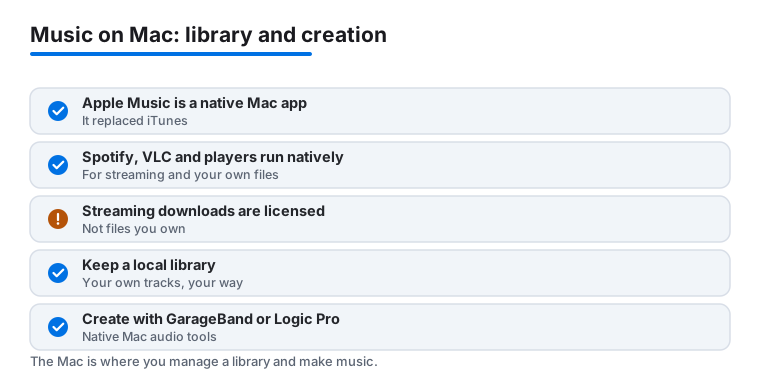
The starting point is Apple Music, which is a built in native Mac app. It is the modern Music app that replaced iTunes, and it handles both your streaming subscription and any songs you have added to your own library. Spotify, Amazon Music, and Apple Podcasts all have real native Mac apps too, so you can keep playback in a proper window rather than a tab. The one honest exception among our streaming picks is SoundCloud, which you use in the browser on a Mac rather than as a downloaded app. That is not a downgrade, the web player is full featured, but it is worth knowing the difference when you set up your dock.
A couple of points keep coming up when people compare services, and they are easy to get wrong. First, when a streaming app lets you save music for offline play, those downloads are licensed offline copies, not files you own. They live inside the app and stop working if your subscription lapses or the track leaves the catalog. If you want music that is truly yours, you need actual files, which is where a local player matters. Second, sound quality varies by service and tier. Lossless audio and spatial audio exist on some services and not others, Apple Music includes both, and the difference is most audible on wired or good wireless headphones rather than laptop speakers. Pick a tier for how you actually listen, not for the number on the box.
Your own files: keeping a local library
If you have ripped CDs, bought downloads, or recorded your own work, you can keep a local library on the Mac that does not depend on any subscription. VLC is the simplest answer here. It is a free, open source native Mac app that plays almost any audio format, including FLAC and odd files that other players refuse, and it does not phone home or show ads. Apple Music can also hold local files alongside your streaming catalog, so many people use it for both. The key idea is that owned files and streamed files behave differently, and a dedicated local player keeps the owned half reliable. It is also worth keeping your owned files backed up somewhere off the Mac, because once you have ripped or recorded them they stay yours regardless of what any service decides to do later.
Making music: native Mac creation tools
This is where the Mac quietly shines. GarageBand is a native Mac app that Apple includes free with the machine, and it is a genuine recording studio: built in drummers, loops, software instruments, and enough tracks to finish a song. When you outgrow it, Logic Pro is the native Mac step up, and it opens the same projects, so nothing you started in GarageBand is wasted. Logic is a one time purchase rather than a subscription. For straightforward editing, trimming a podcast, cleaning up an interview, exporting an MP3, Audacity is a free, open source native Mac app that has done the job for years. Between those three you can record, arrange, and edit without a subscription and without leaving native software. One practical note on latency: when you record live, plug a guitar or microphone into a small audio interface rather than relying on the built in mic, and both GarageBand and Logic stay responsive enough that playing along to a backing track feels natural rather than delayed.
Practice and DJing
For practice, two small native Mac apps earn their place. MuseScore is a free notation app for writing and reading sheet music, with playback so you can check a part before printing it, and Transcribe! slows a recording down without changing its pitch so you can learn a fast part by ear. If you mix rather than make, djay Pro is a native Mac app that reads your Apple Music and Spotify libraries and supports common controllers, with a free tier to start. And if you simply want your existing speakers to sound a little fuller, Boom 3D is a native Mac app that adds a system wide equalizer over whatever is playing.
Organizing the people, not just the sound
One pick is about logistics rather than audio. BAND is a group coordination tool for choirs, worship teams, and hobby bands, and on a Mac you use it through the browser or its desktop app. It is free, and the larger screen makes posting setlists, schedules, and shared files faster than a phone.
A simple way to decide
- Start with the native app that is already there. Open Apple Music, sign in, and see whether its catalog and the included lossless and spatial audio cover you before paying for anything else.
- Add one streaming service that fits your habits. A native app (Spotify, Amazon Music) or the SoundCloud web player, depending on what you listen to.
- Protect what you own. Install VLC for your own files so your local library never depends on a subscription staying active.
- If you make audio, start free. GarageBand and Audacity cost nothing, and you can move up to Logic Pro later without redoing your work.
Remember the two honest caveats as you go: streaming downloads are licensed copies rather than owned files, and the highest sound quality only shows up on gear that can reveal it. Choose for how you really listen and play, and the Mac handles the rest.
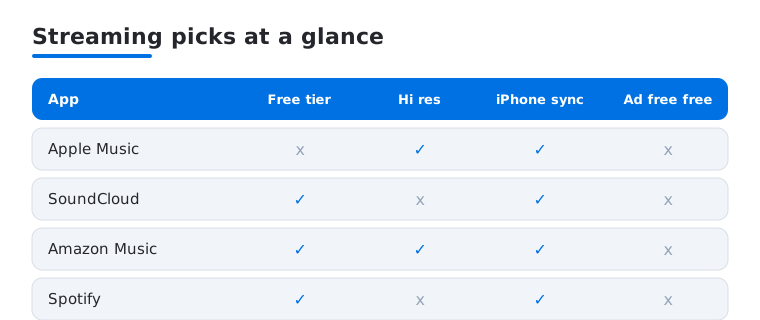
Most people start with a streaming service, so here is how our four picks compare on the things this page keeps coming back to: a usable free tier, lossless or hi res sound, syncing with an iPhone, and whether you can listen ad free.
Frequently asked questions
What is the best free music app for Mac?
It depends what you want to do. For streaming, Spotify and SoundCloud both have solid free tiers. For making music, GarageBand comes free on every Mac and is genuinely powerful. For editing audio or podcasts, Audacity is free and capable, and VLC plays any local file you own. Most people can build a full music setup on a Mac without paying anything.
Can I record and produce music on a Mac without spending much?
Yes, easily. GarageBand is free and includes instruments, loops, and drummers that sound great, so you can record a full demo at no cost. When you outgrow it, Logic Pro opens the same projects and is a one time purchase rather than a subscription. Add Audacity for quick edits and you have a real studio for very little.
Which Mac streaming service sounds the best?
For pure quality, Apple Music and Amazon Music both offer lossless and hi res tiers that sound excellent through good headphones, and Apple adds Spatial Audio. Spotify is the most convenient and has the best discovery, though its highest quality tier has lagged the others. In our testing the difference is most noticeable on wired headphones rather than laptop speakers.
Do these apps sync with my iPhone and iPad?
The Apple ones do best. Apple Music, Apple Podcasts, and your GarageBand and Logic projects all follow you across devices through iCloud. Spotify, SoundCloud, and Amazon Music sync your library and playback through your account, so you can start a song on the Mac and finish it on a phone. It is one of the nicest parts of staying inside the Apple ecosystem.
If I cancel my streaming subscription, do I keep the songs I downloaded?
No. Downloads from a streaming service are licensed offline copies, not files you own, so they stop playing once the subscription ends or a track leaves the catalog. If you want music that stays yours no matter what, you need actual audio files, ripped, purchased, or recorded, and a local player like VLC to play them. Keep that owned library separate from anything you stream.
Are these Mac apps or websites?
Most are native Mac apps: Apple Music, Spotify, Amazon Music, Apple Podcasts, GarageBand, Logic Pro, Audacity, VLC, djay Pro, MuseScore, Transcribe!, and Boom 3D all install and run on macOS. SoundCloud is used in the browser on a Mac rather than as a downloaded app, and BAND runs through the browser or its desktop app. Everything named here works on a Mac in one of those ways.