
Best Music & Audio Apps for iPad (2026)
The iPad is a capable music machine. The big screen makes mixing, tuning and browsing playlists feel relaxed instead of cramped, and a pair of decent headphones turns it into a personal studio or a bedtime sound machine. We spent weeks living with these apps across an iPad Air and an iPad Pro, and these are the ones that earned a permanent spot.
If you also make music on a desktop, our Mac music and audio guide pairs nicely, and you can browse everything else we love in the music and audio hub or the wider best iPad apps roundup.
1. Bose Music
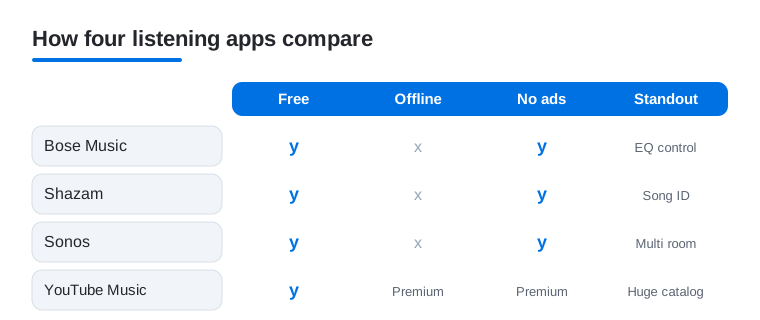
If you own Bose headphones or a smart speaker, this is the control room. On the iPad the layout finally has room to breathe, so adjusting EQ, swapping sources and tweaking noise cancelling takes a single tap instead of a fiddly scroll. In our testing the firmware updates were painless. It is free, and we cover the deeper tricks in our Bose Music on iPad guide.
2. Shazam
Still the fastest way to answer what is this song. We love that it works even with the iPad held across the room from a TV, and the running history means you never lose that track you caught in a cafe. Tap a result and it hands you straight to Apple Music or YouTube. Completely free, no account needed, and Auto Shazam quietly logs everything in the background.
3. SiriusXM
Best for people who miss curated radio and big sports and talk coverage. The iPad screen suits the channel grid, and switching between a music station and a live game feels effortless on the couch. In our testing the podcast catalog was a pleasant surprise. It needs a paid subscription, though a free trial lets you sample the breadth before you commit a cent.
4. Sonos
If your home runs on Sonos speakers, the iPad is the natural command center. The larger canvas makes grouping rooms, dragging volume sliders and queuing across the house genuinely pleasant, where the phone app can feel busy. We found multi room grouping rock solid during a dinner party. The app is free, and it pulls in your existing streaming services rather than charging you again.
5. YouTube Music
The catalog here is very large, especially for live versions, remixes and obscure tracks that never hit other services. On iPad the now playing screen and the switch between audio and video feels natural for couch listening. The free tier works with ads and interruptions. Premium removes them and unlocks background play and downloads, which is what makes it worth keeping for travel.
6. Incredibox
A playful music app for the iPad. You drag sounds onto a row of beatboxers and build layered loops, and the touch screen makes it feel like play rather than production. It works well for kids, classrooms and anyone curious about arranging. A small one time purchase unlocks the full app, with no subscriptions or nagging, which we genuinely appreciate.
7. drum machine apps
The iPad is made for tapping out beats, and a good drum machine turns the glass into a grid of pads you actually want to hit. We keep returning to ones with built in kits and a step sequencer so you can sketch a groove in minutes. Most are free to try with paid sound packs. Plug in headphones and the low latency response feels surprisingly tight.
8. guitar tuner apps
A tuner is the one audio app every guitarist opens daily, and the iPad mic is plenty accurate for it. We like the ones that show a big, clear needle you can read from across the room while your hands stay on the neck. The best are free with optional chromatic modes for other instruments. In our testing they nailed standard tuning in seconds, even in a noisy room.
9. music making apps
This is one of the iPad's strongest uses. A proper multitrack app lets you record vocals, lay down loops and arrange a whole song with your fingers, and the screen size makes editing far less painful than on a phone. Many are free to start, with in app upgrades for extra instruments. Pair one with the editors in our photo and video apps guide and you can score your own clips end to end.
10. piano apps
Whether you are learning scales or just want keys under your fingers, the iPad makes a surprisingly playable piano. We gravitate to apps with falling note tutorials that listen as you play and slow down the tricky bars. Most offer a free lesson tier with a subscription for the full course. Pair it with a Bluetooth keyboard and the iPad becomes a tidy practice station.
11. tuner apps
Beyond guitar, a general purpose tuner covers ukulele, violin, brass and more, and the iPad display makes the readout easy to follow during a rehearsal. We prefer ones that pair a tuner with a metronome so you carry one app to band practice instead of two. The core tuning is usually free. It is the kind of quiet utility you forget about until you need it badly.
12. white noise apps
The iPad turns into a handy bedside sound machine, and a good white noise app is what we reach for to focus or fall asleep. We like the ones that mix rain, fans and brown noise with a sleep timer so nothing plays till morning. Most are free with a small upgrade for extra soundscapes. Propped on a nightstand, the gentle dimmed screen is a nice bonus.
Not sure where to begin? Here is how four of our most-used listening picks compare at a glance.
How to choose music and audio apps for iPad
Most people do not need a dozen audio apps. You need one place to stream, maybe one for podcasts, and possibly a creative app or a quiet utility for sleep. The honest way to choose is to start from how you actually listen, then pick the smallest set that covers it. The big screen helps everywhere, but it matters most for browsing artwork and lyrics, arranging music, and reading a tuner from across the room.
Streaming: pick the catalog and the sound you want
The four mainstream streaming apps all run well on iPadOS, and they are more alike than the marketing suggests. The real differences are catalog quirks, sound quality, and how each one fits the rest of your life.
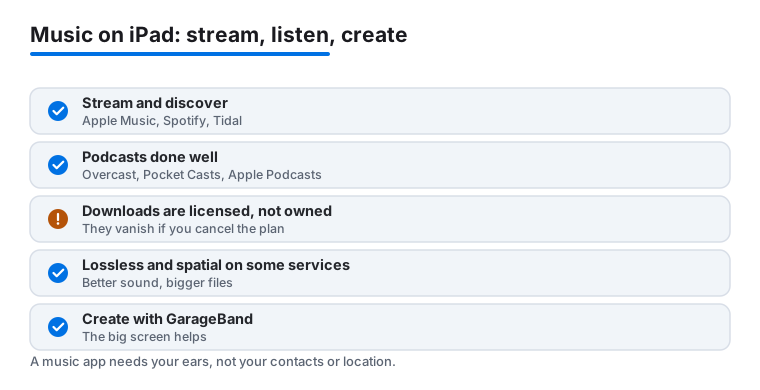
- Apple Music. The natural fit if you live in the Apple world. It hands off cleanly to HomePod and other devices, shows full lyrics on the wide screen, and includes lossless and spatial audio at no extra cost.
- Spotify. The strongest at playlists, recommendations, and sharing with friends. Its podcast catalog is large, so some people use one app for both music and shows.
- YouTube Music. A very large catalog of live versions, remixes, and odd tracks that never reached other services, with an easy switch between audio and video.
- Tidal. Aimed at people who care most about audio quality and want a service built around high resolution streaming.
Do not overthink it. Run the free tier or a trial for a couple of weeks and notice which app you reach for without thinking. That is your answer. One more practical tip: switching services is easy, but rebuilding playlists is not, so if you have years of carefully made playlists in one app, that history is a fair reason to stay put even when a rival looks slightly better on paper.
A note on lossless and spatial audio
Several services now offer lossless audio (closer to the original studio file) and spatial audio (a wider, room-like mix). On an iPad these can sound genuinely better, but only with the right gear. Bluetooth headphones often cannot pass full lossless, so you may need wired headphones or a USB-C adapter to hear the difference. If a casual pair of earbuds is all you own, the standard quality is usually fine, and you can save the upgrade for later.
Downloads are licensed copies, not files you own
This is the part the apps rarely spell out plainly. When you download tracks inside a streaming app for offline listening, you are saving a licensed offline copy, not a file you own. Those downloads play only inside that app, and they disappear the moment you cancel your subscription or the track leaves the catalog. There is nothing wrong with that, it is how streaming works, but it is worth knowing before you treat a streaming library as your permanent collection.
Podcasts: a quick app or a power tool
Podcasts have their own apps, and the right one depends on how much you fiddle with playback.
- Apple Podcasts. Already on the iPad, syncs with your other Apple devices, and covers the basics without setup. For most listeners this is enough.
- Overcast. A favorite for people who want smart speed and a feature that shortens silences, so talky shows move faster without sounding rushed.
- Pocket Casts. Strong queue management and per-show settings, which suits anyone who follows a long list of feeds.
If you only follow a few shows, the built-in app is plenty. The third-party options earn their place once you are tuning playback every day.
Local players for files you actually own
If you have bought downloads, ripped CDs, or recorded your own audio, you want a local player rather than a streaming app. The built-in Apple Music app can hold tracks you add yourself, and you can move files onto the iPad through the Files app and play them there. A dedicated local player can also be handy when you want full control over your own collection, with no account and nothing that vanishes when a subscription ends. This is the opposite of the streaming model, and a sensible home for music you intend to keep for good.
Making music: the iPad at its best
Creation is where the bigger screen pays off most. GarageBand is the obvious starting point: it is a free, capable multitrack studio from Apple, with touch instruments, loops, and enough room to arrange a whole song with your fingers. From there you can layer in the drum machines, piano apps, and other tools above. Add a Bluetooth keyboard or a small audio interface and you can record real vocals and instruments, all without opening a laptop. A good habit is to keep your projects and any audio you record backed up somewhere outside the app, since a creative file you made is genuinely yours, unlike a streaming download, and you do not want it tied to a single app forever.
A short note on privacy
Music and audio apps are usually low risk, but it is still worth a glance at what they ask for. A streaming app, a tuner, or a sleep-sounds app does not need your contacts or your precise location to do its job. A tuner and a recording app do need the microphone, which is reasonable, and that is the one permission to expect. If an app asks for more than it plausibly needs, you can decline in Settings and it will almost always keep working. Checking takes a moment and saves you from handing over data for no reason.
Putting it together
A simple, honest setup for most people is one streaming app you enjoy, the built-in Podcasts app or a power tool if you listen constantly, GarageBand if you want to make something, and a white noise app if you sleep better with sound. Start free, keep what earns a place in your week, and let the rest go. The iPad rewards a small, well-chosen set far more than a cluttered Home Screen.
Frequently asked questions
Do I need a subscription to enjoy music on my iPad?
No. Plenty of the picks here are free, including Shazam, the Sonos and Bose controllers, and the free tiers of YouTube Music. Subscriptions like SiriusXM mainly buy you ad free listening, offline downloads and exclusive content. We suggest starting free and only paying once an app proves it earns a place in your routine.
Can I actually make music on an iPad, or is it just for listening?
You can make real music. Between drum machines, multitrack recorders and playful tools like Incredibox, the iPad is a capable little studio, and the touch screen makes arranging feel intuitive. Add a Bluetooth keyboard or a cheap audio interface and you can record vocals and instruments too. We have finished full song sketches without ever opening a laptop.
Are these apps better on iPad than on iPhone?
For most of them, yes. Mixers, tuners, speaker controllers and piano keyboards all benefit from the extra screen, so you tap accurately instead of squinting. Streaming feels more like a relaxed listening session than a quick check. The one exception is Shazam, which is equally fast on either, since you only need it for a few seconds at a time.
Which app should I start with for my setup?
Match it to what you already own. If you have Sonos or Bose gear, install their app first since it unlocks hardware you paid for. If you mainly stream, try YouTube Music free or your existing service. Curious about making music, start with Incredibox for fun or a free multitrack app to get serious, then build from there.
If I cancel a streaming service, do I lose the songs I downloaded?
Yes. Downloads inside a streaming app are licensed offline copies, not files you own, so they stop working once your subscription ends or a track leaves the catalog. If you want music that stays no matter what, buy the files or keep your own recordings and play them in a local player instead. Streaming is for access, not ownership.
What is the difference between lossless and spatial audio, and do I need special headphones?
Lossless aims to match the original studio file, while spatial audio spreads the mix into a wider, room-like sound. Both can sound better on an iPad, but you often need wired headphones or a USB-C adapter, since many Bluetooth headphones cannot pass full lossless. With ordinary earbuds the standard quality is usually fine, so try it before paying for an upgrade.