
Best Business & Jobs Apps for iPad (2026)
An iPad is a surprisingly good office once you load the right tools onto it. The bigger screen makes job applications, payroll dashboards and creator analytics feel far less cramped than on a phone, and Stage Manager lets you keep two of these apps side by side while you work. We spent weeks running the apps below on an iPad Pro and a base iPad to see which ones earn a home screen spot. For more picks, browse the Business and Jobs hub or our wider roundup of the best iPad apps.
1. LinkedIn
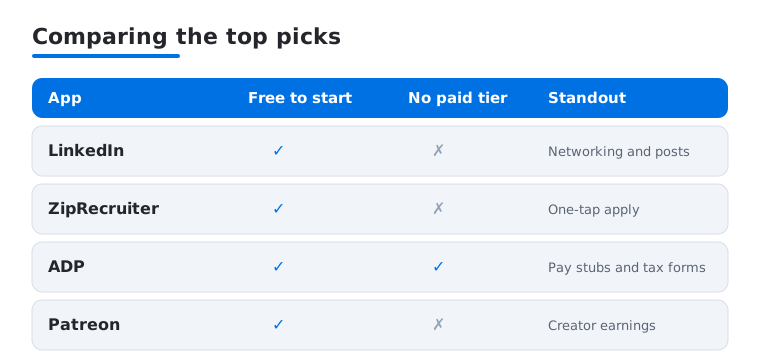
LinkedIn is the one app here almost everyone needs, whether you are quietly job hunting or building a personal brand. On iPad the feed, messaging and job search sit comfortably in a wider layout, and we found writing posts far easier with the larger keyboard. It is free, with optional Premium for who-viewed-you data and InMail. In our testing, applying with a saved profile took under a minute.
2. ZipRecruiter
ZipRecruiter is the app we kept open during an active job search. Its one-tap apply and daily matched listings suit anyone who wants momentum without endless form filling. The iPad screen shows the full job description beside your application, so you stop tapping back and forth. It is free for seekers, and we liked the honest alerts when an employer actually viewed our resume.
3. ADP
ADP is the payroll and HR app many employees are quietly required to use, and it handles pay stubs, tax forms, time off and benefits enrollment. On iPad the dashboard breathes, which makes reviewing a confusing W-2 or year-end summary genuinely easier than squinting at a phone. The app is free, gated behind your employer setup. In our testing, clocking in and checking accrued vacation took seconds.
4. Patreon
If you create anything, Patreon is where your most loyal fans pay to support the work. The creator side shines on iPad, where posting updates, replying to comments and reading earnings charts all feel roomy. Joining is free, with Patreon taking a cut of pledges. We found drafting a members-only post with photos far more pleasant on the tablet than thumbing it out on a phone.
5. DoorDash Dasher
This is the app you actually drive with, and our Dasher tips guide goes deeper. Mounted on an iPad in the car, the map and order details are big and glanceable, which beat fumbling with a tiny phone screen at a confusing pickup. It is free to use once approved. In our testing the larger view made stacked-order routing much clearer, though a phone is still handier for hot-bag runs.
6. DoorDash
The customer-facing DoorDash app matters for business too, whether you are ordering a working lunch for the team or scouting how restaurants present their menus. On iPad the photo-heavy browsing looks great and group orders are easy to manage from one screen. The app is free, with DashPass removing delivery fees. We used it to feed a late deadline night without leaving the desk.
7. FreshBooks
FreshBooks is the invoicing and expense app a lot of freelancers reach for at month end. It runs natively on iPadOS, where the wider layout makes building an invoice, attaching expense photos and reading the dashboard easier than on a phone. There is a paid subscription after a trial, billed by plan. In our testing, creating an invoice and logging a few receipts on the tablet took only a couple of minutes.
How to choose business and jobs apps for iPad
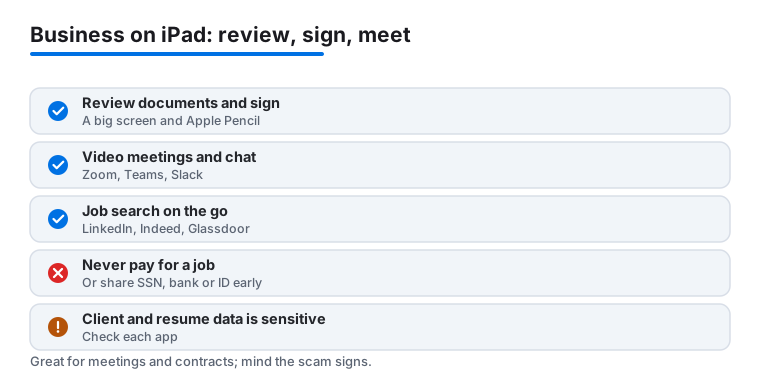
The iPad sits in a useful middle ground for work. It is more comfortable than a phone for the tasks that fill a working day: reading a long document, signing a contract, joining a video meeting, and doing light spreadsheet work. Pair it with a keyboard case and an Apple Pencil and it handles a lot, especially when you are away from a desk. The trick is choosing apps that genuinely use the larger screen rather than ones that simply stretch a phone layout. Below is an honest way to think about job search tools and business tools, and a safety note that matters more than any single app.
Job search apps
If you are looking for work, three apps cover most of the ground. LinkedIn is the broadest. It runs well on iPadOS, and the wider screen makes it easier to read a job description on one side while you adjust your profile or message on the other. Indeed aggregates listings from many sources and is strong for hourly, local and entry-level roles, with a simple apply flow that works fine on the tablet. Glassdoor is less about applying and more about research: salary ranges, interview notes, and reviews written by current and former employees. All three run on iPadOS and all three are free for job seekers, though LinkedIn and Indeed reserve some extras for paid tiers.
When you compare them, weigh a few concrete things rather than star ratings. Does the layout actually use the iPad screen, so you can see a listing beside your notes? Does it play well with Stage Manager, so you can keep a job board open next to your resume? And does it let you save and reuse a profile, so you are not retyping the same details into every application? On a tablet, the apps that get those basics right are the ones you will keep.
Business and productivity tools
For day-to-day business, the iPad covers communication, documents and payments. For team chat and meetings, Slack, Microsoft Teams and Zoom all have native iPadOS apps and handle messages, calls and screen sharing well on the bigger display. Video meetings in particular feel less cramped on an iPad than on a phone, and the front camera is fine for most calls.
For documents and light spreadsheets, Microsoft 365 brings Word, Excel and PowerPoint to iPadOS. With a keyboard attached you can write, edit and review in something close to a desktop way, and Excel handles light spreadsheet work, simple budgets, and reviewing data others send you. Heavy modeling with large workbooks is still smoother on a computer, so be realistic about where the tablet stops. Square is worth knowing if you sell anything in person. The Square Point of Sale app runs on iPadOS and turns the tablet into a checkout with a card reader, which suits a market stall, a pop-up, or a small counter.
A few questions help you decide what to keep. Will you mostly review and sign, or also create from scratch? Reviewing and signing is easy on any of these; heavy creating is better with a keyboard and, for some, a Mac. Do you need it to work offline, for example on a plane or in a basement office? And how does it handle a keyboard and the Apple Pencil, since signing a contract or marking up a PDF is one of the iPad's real strengths?
A safety note on job scams and your data
Job hunting is a moment when scammers go looking for victims, so keep a few rules firmly in mind. Never pay for a job. A real employer does not charge you for training, equipment, a background check, or a starter kit. Be wary of a recruiter who will only ever talk through chat and avoids a phone or video call, especially one who pushes you to move the conversation to a personal messaging app. Do not share your Social Security number, bank account details, or a photo of your ID before you have a verified written offer from a company you have confirmed is real. If an offer arrives fast, pays unusually well for little work, or pressures you to act today, slow down and check it.
Your own data deserves the same care. A resume holds your full work history and contact details, and client files can hold other people's information, so it is worth knowing what each app stores and where. Before you upload sensitive documents, glance at what the app keeps and whether you can delete it later. On iPadOS you can review what an app may access in Settings, and you can turn on a passcode, Face ID or Touch ID so that a lost or borrowed iPad does not hand someone your accounts. Treat your resume and any client data as sensitive by default, because once it is shared you cannot pull it back.
Putting it together
Most people do not need all of these at once. A reasonable starter set is one job search app you will actually open every day, one communication app your team already uses, and Microsoft 365 if you handle documents. Add Square only if you take payments, and add a driver or creator app only if that is your line of work. Confirm what is free versus where money changes hands, check that each app runs natively on iPadOS rather than as a stretched phone app, and keep the safety note above in view whenever a job opportunity feels rushed or asks for money or personal identifiers up front.
One last habit makes the iPad more useful for work over time. After a week, look at which of these apps you actually opened and which you only installed out of optimism. Move the daily ones to your dock or first home screen, and pair the two you use most so Stage Manager opens them together, for example a job board and your resume, or Teams and a Word document. Keep your sign-in details in a password manager rather than retyping them, and turn on the iPad passcode along with Face ID or Touch ID before you store anything sensitive. None of this is about chasing the newest app. It is about a small, trusted set that does real work, respects your data, and matches the way you actually move through a day.
Frequently asked questions
Can an iPad really replace a laptop for this kind of work?
For job searching, payroll checks, creator posting and light admin, yes, especially with a keyboard case and Stage Manager. Heavy spreadsheet work or anything needing desktop software is still smoother on a Mac, so many people keep both and use the iPad on the go.
Are these business and jobs apps free?
Most of the core apps here are free to download. The DoorDash Dasher app costs nothing once you are approved, LinkedIn and ZipRecruiter are free for job seekers, and Patreon and DoorDash only take a cut or fee when money changes hands. FreshBooks is the exception, since it moves to a paid subscription after its trial. Premium tiers elsewhere are optional.
Which app should a first-time gig worker start with?
It depends on what is busy in your area. DoorDash Dasher tends to have the widest coverage and the simplest onboarding, which makes it a sensible first choice for many people. We suggest signing up, watching how many offers arrive in your first week, and adding a second platform only if demand is thin.
Do these apps work the same on iPhone or Mac?
Mostly yes, though the layouts differ. The phone versions are handier when you are moving, and a few tools feel better on a bigger screen. You can compare our iPhone business apps and Mac business apps guides to pick the right device for each task.
How do I spot a fake job posting or recruiter?
Watch for a few patterns. A real employer never asks you to pay for training, equipment or a background check, and will not send money to you and ask you to forward part of it. Be cautious if a recruiter only communicates by chat, pushes you to a personal messaging app, or asks for your Social Security number, bank details or a photo of your ID before a verified written offer. When in doubt, find the company's official site yourself and contact them through their listed channel rather than a link in the message.
Is it safe to upload my resume and client files to these apps?
It can be, but check first. Your resume holds your contact details and full work history, and client files may hold other people's information, so look at what each app stores and whether you can delete it later. Upload only what an application actually needs, and protect the iPad itself with a passcode and Face ID or Touch ID so a lost device does not expose your accounts.