
ZipRecruiter on iPad and iPhone: My Real Job Hunt Walkthrough
When I went looking for my last role, ZipRecruiter was the app I kept open on both my iPad on the couch and my iPhone on the go. It pulls listings from thousands of boards, lets you fire off an application in a tap or two, and nudges you when something fresh matches what you want. I spent a few weeks living inside it across both devices, so in this guide I will show you how to get set up, the features that genuinely move a search forward, the tips that got me more replies, and the spots where it frustrated me. One note up front: this is the ZipRecruiter Job Search app for job seekers, not the separate ZipRecruiter employer app, which is a different download.
Getting ZipRecruiter set up on your iPad and iPhone
ZipRecruiter Job Search is free to download from the App Store, and it runs as one universal app on both the iPad and the iPhone, so a single download covers you on either screen. As of mid 2026 it needs iOS 17 or later on the iPhone and iPadOS 17 or later on the iPad, so a fairly recent device is required. Because it is an iOS app, it also shows up for Mac models with an Apple M1 chip or newer and on the Vision Pro, but those are the same phone style app in a window, so I would not count on a true Mac experience.
Open it, create an account with your email or Apple sign in, and the app walks you through a short setup. You tell it the job titles you are after, your location or whether you want remote work, and your salary range. The whole thing took me under five minutes. If you use Sign in with Apple and pick the hide my email option, ZipRecruiter only sees a relay address, which is a small privacy win if you would rather not hand over your main inbox to a job board straight away.
The piece that pays off later is your profile and resume. You can upload a resume straight from Files or iCloud Drive, and on the iPad I found the bigger keyboard made it far easier to tidy up my summary and work history before applying anywhere. There is also Phil, ZipRecruiter's AI career advisor, which will ask you a few questions about your past work and then draft profile and resume wording for you. I used it as a starting point, not gospel: it gave me a usable summary, but I rewrote chunks so it sounded like me rather than a template. My honest advice is to build the profile fully on the iPad where you have room to think, then let it sync to your iPhone. Because your account lives in the cloud, everything you do on one device shows up on the other, so I would browse roles on the iPad at night and then tap apply from my iPhone the next morning when a recruiter was likely online.
The features that actually matter
After a few weeks of daily use, these are the parts of ZipRecruiter I leaned on the most.
- One Tap Apply. On listings that support it, you apply with a single tap using your saved profile. The app sometimes labels this as one click apply, but it is the same idea, and it genuinely lets you fire off ten applications in the time a normal site takes for one. Not every listing offers it; some still bounce you out to the employer's site to finish.
- Job alerts. Set your criteria once and the app sends new matches to your iPhone as they post. You can get these as push notifications, email, or text, and being early to a fresh listing matters, so the alerts kept me near the top of the pile.
- Phil and the match rating. Each job shows how well it lines up with your profile, and Phil layers conversational suggestions on top, pointing me toward roles I had not searched for. Treat the rating as a rough sort, not a verdict; I still found good jobs it scored low and weak ones it scored high.
- Application tracking. A single screen shows what you applied to and whether the employer has viewed it. ZipRecruiter notifies you the moment your application or resume gets opened, which took a lot of the guesswork out of waiting.
- Be Seen First and notes. For roles you care about, you can add a short note to your application so you are not just another one tap submission. This is the feature I wish I had used sooner.
- Saved jobs. I would bookmark interesting roles on the iPad and come back to apply once I had tweaked my resume.
None of this is buried in menus. The layout is clean and the same on both devices, so there is nothing new to learn when you switch screens.
One newer wrinkle: in March 2026 ZipRecruiter also launched a ChatGPT app that lets you explore matching jobs from inside ChatGPT. That is separate from the iOS app and needs a ChatGPT account, so I mention it only so you know it exists, not as a reason to skip the App Store version.
Practical tips from a real search
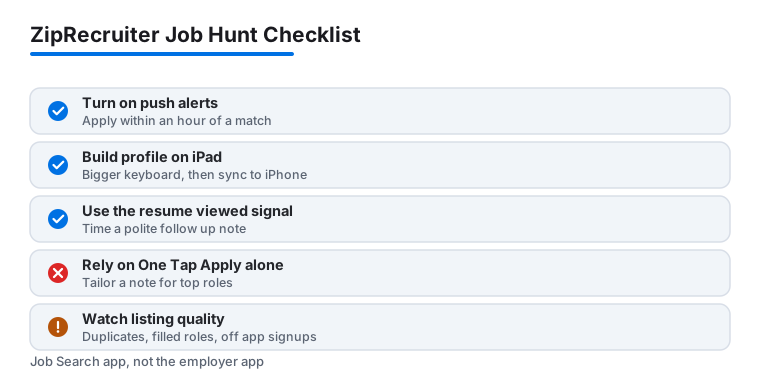
A handful of habits made the app work harder for me. First, turn on push notifications and actually act on them quickly. The jobs that replied fastest were the ones I applied to within an hour of the alert landing, so I kept the alerts on my iPhone and treated them like time sensitive messages. If you only check email, switch the alert delivery to push or text in settings, because the email digest can lag by a day.
Second, do not lean only on One Tap Apply for roles you really want. For my top picks I opened the listing, read it properly, and used the note field or a tailored resume rather than blasting the generic version. The one tap flow is handy for volume, but a little personalising got noticeably more callbacks. Third, keep your job title list broad at first. I added two or three variations of the same role, which surfaced listings I would have missed with a single narrow search, then tightened it once I saw what was actually out there.
Fourth, lean on the resume viewed signal to time your follow up. When the tracker showed an employer had opened my application, that was my cue to send a short, polite note through whatever contact the listing offered. Finally, check the app once in the morning and once in the evening rather than refreshing all day. New roles post in waves, and that rhythm kept me current without burning out on the search. One privacy habit worth keeping: review what your public profile shows before you upload, since a fuller profile is more visible to the employers and recruiters who search ZipRecruiter's database.
The limits and downsides to know
ZipRecruiter is useful, but it is not flawless, and a few things wore on me. The biggest is listing quality. Because the app aggregates from so many sources, you will hit duplicates, roles that were already filled, and the occasional posting that feels more like a lead generator than a real opening. I learned to scan the company name and the post date before getting my hopes up, and to be wary of any listing that pushed me off the app to register somewhere else.
The notifications can also tip into noise. If your criteria are too loose, the alerts pile up fast, and I had to go back and tighten my filters so the matches stayed relevant. One Tap Apply, handy as it is, makes it a little too easy to apply on autopilot, and a scattershot approach rarely lands interviews. Phil's suggestions are pleasant but generic in places; it is an AI drafting tool, so read anything it writes before you send it, and do not assume its match scores reflect what a hiring manager will think.
On the hardware side, there is no separate iPad optimised layout. On the larger screen it is essentially a bigger version of the phone app rather than a redesigned tablet experience, and the same goes for the Mac and Vision Pro versions, which are just that iOS app in a window. It works fine, it just does not take full advantage of the bigger screen. On privacy, remember that the whole point of the app is to make your profile findable, so the more you fill in, the more employers can see; if you are job hunting quietly while employed, keep that in mind. None of these are dealbreakers, but they are worth knowing before you rely on it as your only tool.
Good alternatives worth comparing
ZipRecruiter is one of several solid job search apps, and the right pick depends on how you hunt. LinkedIn is the one I keep alongside it, since it pairs listings with networking and lets recruiters find you directly, which matters for senior or niche roles. Indeed has the deepest sheer volume of postings if you want the widest net, while Glassdoor is the app I open to check salary ranges and read honest company reviews before an interview. Using two or three together covered the gaps any single app left.
It also helps to think about the wider toolkit that supports a career or a side income. If you are weighing gig work to bridge a gap, our guide on advanced earning tips for iPhone DoorDashers is a practical read, and creators building independent income will find plenty in our look at the top iPad apps for growing a Patreon audience. For the full lineup, browse our best business and jobs apps for iPad roundup, or step up to the wider Business & Jobs hub to see everything we cover.
FAQ
Is the ZipRecruiter app free to use?
Yes, the Job Search app is free for job seekers. You can search listings, set up alerts, apply, track applications, and use Phil without paying. ZipRecruiter makes its money from the employers who post roles, not from people looking for work. The separate employer app is a different product.
Does ZipRecruiter have a separate iPad app?
No, it is one universal app that runs on both the iPad and the iPhone from a single download, and it needs iPadOS 17 or later. The iPad version is essentially a larger version of the phone layout rather than a redesigned tablet experience, but it works well for browsing and editing your profile on a bigger screen. The same iOS app can also run on Apple M1 Macs and the Vision Pro.
What is One Tap Apply and should I always use it?
One Tap Apply, sometimes shown as one click apply, lets you submit an application with a single tap using your saved profile, which is good for applying to many roles quickly. For the jobs you care about most, though, I would open the listing and add a tailored resume or a note using the Be Seen First option, since that personal touch got me more replies.
Who is Phil in the ZipRecruiter app?
Phil is ZipRecruiter's AI career advisor. It asks you a few questions about your experience, then drafts profile and resume wording and recommends roles that may fit. It is genuinely useful as a starting point, but treat its drafts and match scores as suggestions to review rather than finished work, since it is an automated tool.
Why am I getting job alerts that do not fit?
That usually means your search criteria are too broad. Go into your alert settings and tighten the job titles, location, and salary range, and you can also switch delivery between push, email, and text. Once I narrowed mine, the notifications became far more relevant and a lot less frequent.