
Best Business & Jobs Apps for iPhone (2026)
Your iPhone is the one work tool you always have on you, so the apps that earn a spot on it have to pull real weight. We spent a few weeks living inside the picks below across a regular workweek, chasing job leads on the train, taking delivery shifts on weekends and scrolling listings while waiting for coffee. These are the four that genuinely earned their keep. For more, browse the Business and Jobs hub or our wider roundup of the best iPhone apps.
1. ZipRecruiter
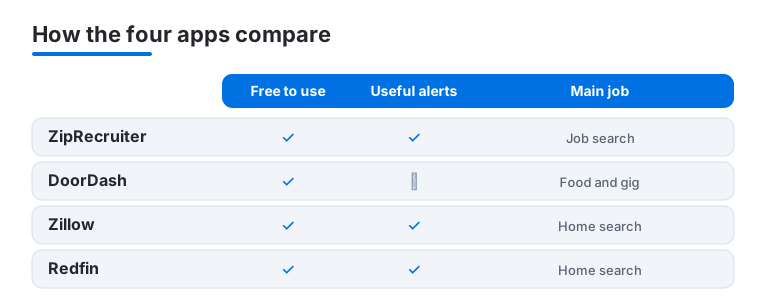
ZipRecruiter is the app we kept open during an active job search, and it suits anyone who wants momentum instead of endless forms. One-tap apply and daily matched roles mean you can fire off applications during a lunch break. It is free for job seekers. In our testing, the push alert that tells you when an employer actually opened your resume was the feature that kept us coming back.
2. DoorDash
The DoorDash app cuts both ways for work, whether you are ordering a desk lunch on a deadline day or sizing up how rival restaurants present their menus. On iPhone the photo-led browsing is quick and group orders are easy to wrangle one-handed. The app is free to use, with fees charged on orders and an optional DashPass subscription that drops delivery fees. We leaned on it to feed a late desk night without stepping away.
3. Zillow
Zillow is the app we reach for first when a home search starts, and it suits buyers, renters and anyone curious what a nearby place sold for. The map view and saved searches feel natural on iPhone, and the alerts for fresh listings help when inventory moves fast. It is free. In our testing the Zestimate was a fine starting point, though we treated it as a rough guide.
4. Redfin
Redfin is the listings app we paired with Zillow for a second opinion, and its data often felt a touch fresher on homes that had just hit the market. It suits serious buyers who want to book tours and track price cuts, with useful price-cut and new-listing alerts that flag changes fast. It is free, and Redfin earns through its own brokerage. On iPhone the clean map and honest days-on-market badge made it easy to spot listings quietly going stale.
How to choose business and jobs apps for your iPhone
Work apps on a phone fall into two broad jobs: finding work, and running or working inside a business once you have it. The picks featured above lean toward the search and gig side, but the wider category is bigger than four apps, so this guide covers what to look for across both. The goal is to match the app to the task in front of you rather than collecting the ones with the longest feature lists. A few things we weighed while testing:
- Speed to value on a small screen. A good work app lets you do something useful one-handed in under a minute. One-tap apply, a quick photo-led order, or a saved search that loads instantly all pass this test. An app that buries the action behind menus does not.
- Useful alerts, not noise. Push that tells you something actionable (an employer opened your resume, a message in a team channel, a fresh listing) earns its place. If an app only pings you to re-engage, turn its notifications off in iOS Settings.
- Know where the paywall sits. Many of these apps are free to download but charge for the part you actually need. Check whether the feature you rely on is free before you build a routine around it.
Apps for the job search
If you are looking for work, your phone is genuinely useful because most early steps (browsing roles, sending an application, replying to a recruiter) take seconds. The mainstream options all run on iPhone:
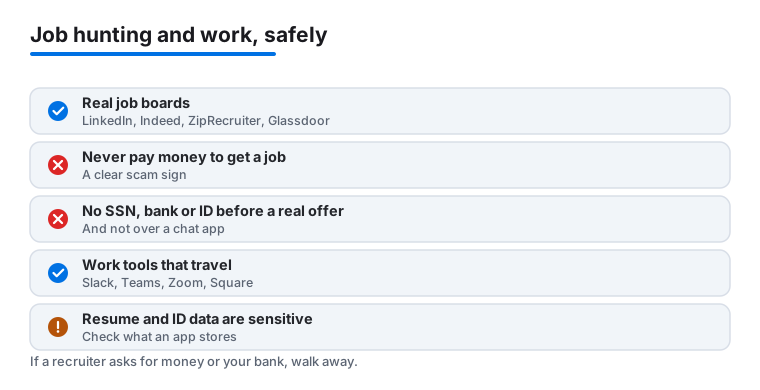
- LinkedIn is the broadest. It combines a profile, a feed, job listings and direct messaging with people at companies. The Easy Apply flow lets you send applications quickly, and you can save searches and set alerts for new postings.
- Indeed aggregates listings from many sources, which makes it strong for raw coverage. You can upload a resume once and apply to many roles, and the salary and company review data help you judge a posting.
- ZipRecruiter (featured above) is built around matched roles and one-tap apply, which suits people who want momentum.
- Glassdoor is less about applying and more about research. Use it to read employee reviews, see reported salary ranges and get a feel for a company before an interview. It also carries job listings.
A practical approach is to keep your resume current in one place, then use two or three of these apps in parallel rather than relying on a single source. Coverage and quality vary by industry and city, so what feels thin in one app may be full in another.
Apps for running or working in a business
Once you are employed or running something of your own, a different set of apps does the daily work. These all have real iPhone apps:
- Slack and Microsoft Teams handle team messaging, channels and file sharing. Which one you use is usually decided by your employer rather than by preference.
- Zoom covers video calls and meetings, and the iPhone app is fine for joining on the move, though screen sharing is easier on a larger device.
- Square turns an iPhone into a point of sale for a small business, taking card payments and tracking simple sales. It pairs with Square hardware but also works with the phone alone for many transactions.
- QuickBooks handles invoicing, expense tracking and basic bookkeeping, which is useful for freelancers and small business owners who want to capture receipts and send invoices from the phone.
Staying safe from job scams
Job hunting is a common target for fraud, and the warning signs are consistent. Read this part carefully, because the cost of getting it wrong is high.
- Never pay money to get a job. A real employer does not ask you to pay for training, equipment, a background check or a starter kit before you begin. Any request to send money, buy gift cards, or accept a check and forward part of it is a scam.
- Be wary of recruiters who only use chat apps or personal email. Legitimate recruiting tends to use a company email domain and a verifiable phone number. If someone moves you straight to a personal Gmail address, a text thread, or an encrypted chat app and avoids any official channel, slow down and verify who they are.
- Do not share sensitive identity data before a verified offer. Hold back your Social Security number, bank account details, and photos or scans of your ID until you have a written offer from a company you have confirmed is real. Look the company up independently, and contact it through a number or address you found yourself rather than one the recruiter gave you.
- Treat urgency as a red flag. Pressure to act immediately, to skip an interview, or to keep the arrangement secret is a tactic, not a sign of a good opportunity.
A note on privacy
Resume and identity data are sensitive. A resume often carries your full name, contact details, work history and sometimes your address, and ID documents carry far more. Before you load all of that into a job app, it is worth a minute to check what the app stores and who it shares with. On iPhone you can read the App Store privacy summary on the app listing, and you can review which apps you have given access to your contacts, files and photos under Settings. Share the minimum a step actually requires, prefer applying through the company channel when you can, and remember that anything you upload to an app may be retained even after you stop using it.
Putting it together
Pick by task. For a search, run a couple of the job apps in parallel and keep one polished resume ready to send. For day-to-day work, the messaging, calls, payments and bookkeeping apps are usually chosen for you or by the size of your operation. Across all of them, keep your guard up on anything that asks for money or sensitive data, and trim notifications down to what is genuinely actionable.
Frequently asked questions
Are these business and jobs apps free?
Yes, all four are free to download and use. ZipRecruiter is free for job seekers, the real estate apps make money through brokerage and ads rather than charging you, and DoorDash only adds a fee or optional DashPass subscription when you actually order food.
Which job app should I start with?
For most people ZipRecruiter is the fastest start because its one-tap apply and matched listings get you moving quickly. If you are also driving for income, DoorDash is the easiest gig to onboard. We suggest running a job app and a gig app together so something is always earning while you search.
Should I trust Zillow and Redfin price estimates?
Treat them as a starting point, not a final number. In our testing the estimates were close enough to set expectations but often drifted from the actual sale price. Cross-check Zillow against Redfin, look at recent nearby sales, and lean on a local agent for anything you are serious about.
Do these apps work the same on iPad or Mac?
Mostly, though the layouts change with screen size. The iPhone versions shine when you are out and about, while bigger displays make listings and job descriptions easier to read. You can compare our iPad business apps and Mac business apps guides to match the right device to each task.
How can I tell if a job offer is a scam?
Watch for a few consistent signs. A real employer never asks you to pay for training, equipment or a background check, and never sends a check for you to deposit and partly forward. Be cautious if a recruiter only uses a personal email or a chat app instead of a company address, and do not share your Social Security number, bank details or ID copies until you have a written offer from a company you have independently verified. Pressure to act fast or keep things secret is a red flag.
Is it safe to upload my resume and ID to a job app?
Resume and identity data are sensitive, so be selective. Check the app's App Store privacy summary to see what it collects and shares, and review the permissions you have granted under iPhone Settings. Share only what a step actually requires, prefer applying through the company's own channel when you can, and hold back ID scans and bank details until an offer is confirmed. Keep in mind that anything you upload may be retained even after you stop using the app.