
Playing Fruit Ninja on Your iPhone and iPad: A Real Hands-On Guide
Fruit Ninja is one of those games almost everyone has swiped at least once, and there is a good reason it keeps showing up on home screens years later. We spent a week with it across an iPhone and an iPad to see how it holds up in 2026, whether it is genuinely good for kids, and where it quietly frustrates. The short version is that it still works, it installs in seconds, and the bigger iPad screen changes the feel more than we expected. One thing to sort out before you download anything: there are now several apps with Fruit Ninja in the name, and picking the wrong one is the most common mistake we see. Here is the friendly, practical rundown we would give a friend deciding whether to hand it to a child or keep it.
Which Fruit Ninja you actually want
This trips up more people than the gameplay ever will. Search Fruit Ninja in the App Store on an iPhone or iPad and you get a small pile of results, and they are not the same game. Here is how we sort them.
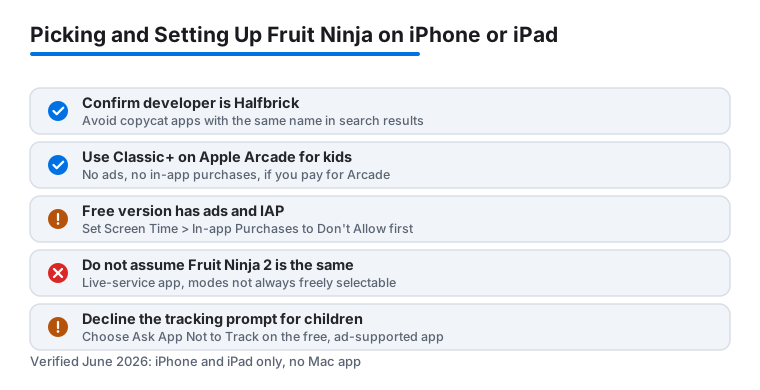
The plain one called Fruit Ninja (the long-running free app, developer Halfbrick) is what most people mean. It is free, it runs on current iOS and iPadOS, and it is supported by ads plus in-app purchases. This is the one this guide is mostly about, because it is what a kid will land on if they search.
Then there is Fruit Ninja Classic+, which lives on Apple Arcade. Same slicing, but no ads and no in-app purchases at all, because Apple Arcade games strip those out. The catch is that it needs an Apple Arcade subscription, which is a monthly fee per household. If you already pay for Arcade, or you are weighing it for other reasons, the+ version is the calmer experience for a child, full stop. No ad breaks, nothing to buy.
Fruit Ninja 2 is a separate, newer app with more of a live-service shape: events, currencies, and modes that are not always freely selectable. It is fine, but it is busier and pushier than the original, and we would not start a young child there. There is also a brand new title, Fruit Ninja Adventures, arriving on the App Store on June 30, 2026; it is a different style of game with new mechanics, not a straight replacement, so do not assume it plays like the classic.
Getting it on your iPhone or iPad in under a minute
Once you know which app you want, this is the easy part. For the free Fruit Ninja there is no streaming setup or workaround to wrestle with. We searched for it by name, double-checked the developer was Halfbrick so we did not grab a copycat, tapped get, and were slicing within a minute on both devices. The file size is small enough that it will not eat into your storage in any meaningful way.
The free version is supported by ads and offers in-app purchases for blades, backgrounds, and a bundle that removes the ads. We played it that way first for an honest feel, and it is completely playable. If you are setting this up for a child, this is the moment to open Settings, go to Screen Time, then Content and Privacy Restrictions, then iTunes and App Store Purchases, and set In-app Purchases to Don't Allow before you hand the device over. Doing that calmly ahead of time beats discovering a surprise charge later. If you went the Apple Arcade route with Classic+, you can skip that step entirely, since there is nothing to buy inside the game.
The modes that actually matter
Fruit Ninja looks simple, and at its heart it is, but the modes give it more range than a quick glance suggests. After bouncing between them, these are the ones we kept coming back to.
- Classic: The pure version. Slice fruit, avoid the bombs, and one bomb or three dropped fruits ends the run. It is tense in the best way and the mode we recommend starting with.
- Zen: A relaxed sprint, ninety seconds, no bombs at all. This is the one we handed to younger players first, because there is no harsh penalty and it builds confidence fast.
- Arcade: A frantic sixty-second mode with power-ups and special bananas that freeze time, double points, or trigger a frenzy. It is loud, chaotic, and where the highest scores live.
There are also seasonal events and unlockable blades that subtly change how slicing feels. None of it is essential, but it keeps the game fresh over weeks rather than days, which matters if a kid will return to it again and again. One honest note: in Fruit Ninja 2 those modes are not always freely available the way they are in the original, so if mode choice matters to you, that is a real reason to stick with the classic app.
Tips that made us noticeably better
A few small habits turned our flailing into something that looked almost skilful. First, swipe through multiple fruits in one long stroke rather than poking at them one by one. The game rewards combos generously, and a single curved slice scores far more than three frantic taps. On the iPad especially, the extra room lets you carve big looping arcs that rack up points.
Second, keep your eyes on the bombs, not the fruit. It sounds backwards, but the fruit takes care of itself once your hand knows the rhythm. The bombs are what end runs, so we learned to track them and slice around them. Third, use one finger, not your whole hand. We started by mashing with several fingers and the game read it as messy input, while a single deliberate finger gave us cleaner combos and fewer accidental bomb hits. Fourth, in Arcade, hold the special bananas for when the screen is busiest so the score multiplier or frenzy counts for as much as possible. And if a screen protector or case lip is catching your swipe near the edges, that is worth fixing before you blame your reflexes; on a bare iPad we got noticeably smoother strokes.
One more practical thing: the game logs you in through a Halfbrick or platform account for leaderboards. You can play perfectly well without signing in, and for a child we would skip the account so there is no social or sharing layer to manage.
Is it really educational, or just fun?
The honest answer is that it is mostly fun, with some genuine side benefits, and we think that framing is fairer than overselling it. Fruit Ninja is good for hand-eye coordination and quick reaction timing, and we watched a young tester get visibly faster and more precise over a few sessions. The bomb avoidance also nudges kids toward thinking a half second ahead rather than reacting blindly, a small but real bit of impulse control.
There is light learning around fruit names and counting combos too, though it is incidental rather than a structured lesson. We would not call this a teaching app in the way a dedicated learning title is, and we would push back gently on any listing or review that frames it as one. What it does well is hold a child's attention while quietly sharpening reflexes and focus, and on a roomy iPad screen even small hands get a proper workout. If you want real educational value, pair it with something built for that. As a fun game that happens to be good for coordination, it earns its place.
The honest downsides to weigh
We want you to go in clear eyed. The biggest nag in the free version is the advertising. Between runs you will hit ads, sometimes a video you have to sit through, and for a young player that interruption gets old quickly. The paid bundle removes them, and if your child is going to play often, that one purchase buys a calmer experience. The cleaner answer, if you can swing the subscription, is Fruit Ninja Classic+ on Apple Arcade, which has no ads and nothing to buy at all.
The other thing to watch is the gentle pull toward buying blades and backgrounds. They are cosmetic and change nothing about how you play, but they are dangled often, and kids notice. That is exactly why we lean so hard on setting up purchase restrictions first. On privacy, the free app shows personalized ads and can ask to track you across apps; when iOS pops the App Tracking Transparency prompt, choosing Ask App Not to Track limits that, and for a child we always decline it. Beyond that, the gameplay loop is shallow by design. It is good in short bursts but it is not a deep game with progression to chase, so if you crave goals and unlocks that build over time, it may feel thin after a while. Taken for what it is, a quick pick-up-and-play, none of this is a dealbreaker.
Good alternatives if you want something different
Maybe you love the fast, swipe-based feel but want a fresh challenge, or you are after something with more to chase over time. There are good options that run well on the same devices. If the endless, reflex-driven rhythm is what hooked you, Subway Surfers scratches a very similar itch, and we get into its lesser-known tricks in our guide on the hidden features of Subway Surfers on iPad.
If you would rather slow things down and reward precision over speed, 8 Ball Pool is a solid pivot that still plays well with a single finger, and our piece on mastering spin and power in 8 Ball Pool will get you winning faster. And for a wider sense of what plays well on Apple hardware, our roundup of the best gaming apps for iPhone and the wider gaming app hub are where we would start.
FAQ
Is Fruit Ninja free on iPhone and iPad?
Yes. As of 2026 the main Fruit Ninja app from Halfbrick is a free download from the App Store on both devices, and the free version is fully playable. It includes ads between runs and optional in-app purchases for blades, backgrounds, and an ad-free bundle. If you have an Apple Arcade subscription, Fruit Ninja Classic+ is the same game with no ads and no in-app purchases at all.
What is the difference between Fruit Ninja, Fruit Ninja Classic+, and Fruit Ninja 2?
Fruit Ninja is the free, ad-supported original. Fruit Ninja Classic+ is the Apple Arcade version with no ads or purchases, but it needs an Arcade subscription. Fruit Ninja 2 is a separate, newer app with events and currencies where you cannot always freely pick a mode. For a young child we would choose Classic+ if you have Arcade, otherwise the free original with purchases turned off. A different new title, Fruit Ninja Adventures, arrives June 30, 2026 and plays differently.
Is Fruit Ninja a good game for young children?
We think so, with a couple of sensible setup steps. Zen mode has no bombs and no harsh penalty, which makes it a gentle starting point, and the swiping is good for hand-eye coordination. Before handing over your iPhone or iPad on the free version, open Settings, then Screen Time, then Content and Privacy Restrictions, and set In-app Purchases to Don't Allow so a child cannot accidentally buy blades or backgrounds.
Does it play better on an iPad than an iPhone?
In our testing the iPad had a real edge for slicing. The larger screen gives you room for big sweeping strokes, which score higher and simply feel more satisfying, and it suits small hands well. The iPhone is more portable and perfectly fun in short bursts, so it comes down to whether you value the bigger canvas or pocket convenience.
How do I get higher scores in Fruit Ninja?
Slice through several fruits in one long curved stroke rather than poking at them individually, since the game rewards combos heavily. Keep your eyes on the bombs instead of the fruit so you do not end a run early, and use a single deliberate finger for cleaner swipes. In Arcade mode, hold the special bananas for the busiest moments so the score multiplier or frenzy counts for more.