
Using the Bed Bath & Beyond App on iPhone and iPad to Outfit Your Desk
When I decided my iMac deserved a proper setup, a monitor riser, a desk lamp, some cable bins, and a chair cushion, the Bed Bath & Beyond app is where I started hunting. It is not the first place people think of for workspace gear, but the home and storage range is deep and the coupons are real if you know where to look. Before anything else, a correction worth making up front: this is an iPhone and iPad app, not a Mac app. The old Bed Bath & Beyond chain went bankrupt in 2023, and the brand now lives under Beyond Inc, the company that used to be Overstock. The app you download today is even listed as Bed Bath & Beyond by Overstock. I have spent a few weeks shopping it across my iPhone, my iPad, and the website on my iMac, so this guide covers getting it running, the features that genuinely help, the coupon habits that saved me money, the rough edges, and a couple of apps worth comparing before you check out.
What this app actually is, and which Apple devices run it
Let me clear up the platform question, because the name confuses people. The Bed Bath & Beyond app on the App Store is published by Beyond Inc and uses the same code base as the old Overstock app, so the listing reads Bed Bath & Beyond by Overstock. It is built for iPhone and iPad. As of mid 2026 it requires iOS 17.6 or later on the phone and iPadOS 17.6 or later on the tablet, and the current build is in the 2026.6 range, so the app is being maintained rather than left to rot.
There is no native Mac app. If a site tells you to install the Bed Bath & Beyond Mac app, they are wrong, or they mean running the iPad version on an Apple Silicon Mac through the iPhone and iPad Apps tab in the Mac App Store. I would not rely on that route. Whether an iPad app even shows up on a Mac depends on a toggle the developer controls, and many retail apps are marked not verified for macOS, meaning Apple has not confirmed they behave correctly with a trackpad and a resizable window. When I tried, it was clearly a phone screen stretched onto a desktop.
So here is the honest setup. Install the app on your iPhone, your iPad, or both. Open it, then either create an account or sign in. You can browse as a guest, but make an account on day one, because that is what ties your coupons, your order history, and your saved addresses together. On the iMac, I shop the website at bedbathandbeyond.com in Safari, where the same account and cart sync over once I am signed in. My routine is to browse and compare on the big iMac display, because seeing a desk lamp at full size beats squinting at a phone, then I open the app on the iPhone or iPad to finish, where Apple Pay and Face ID make checkout quick. The iPad sits in a nice middle ground here: bigger than the phone, and it actually runs the real app rather than a website.
The features that actually matter
After a few weeks of use, these are the parts of the app I lean on for a workspace. I am only listing what I confirmed is in the current build, since a lot of older write ups describe features that came and went when the brand changed hands.
- Category browsing. The home office, storage, and organization sections group the riser, the bins, the lamps, and the drawer organizers together, so you are not wading through unrelated kitchenware. Search understands plain phrases like desk drawer organizer.
- The coupon wallet. The app keeps your codes in one place and surfaces percentage off offers and clearance events. There is usually a first purchase coupon for shopping in the app itself, and that single feature is the main reason to use the app over a plain web search.
- Price drop alerts. Add an item to your wish list, turn on notifications, and the app pings you when the price falls. A desk lamp I was watching dropped by about a third after a week.
- Wish lists. I built a desk setup list and added items as I found them, then bought the lot once I had compared everything.
- Barcode scanning. If you are standing in a store or holding a box you already own, you can scan the barcode to pull up the product or add it to a registry. This is the closest thing the app has to the visual search some older guides mention, and it is more reliable because it reads an exact code rather than guessing from a photo.
- Order tracking and saved payment. Checkout remembers your logins and cards, and you can follow an order from confirmation to delivery without leaving the app.
One correction on a feature you may have read about elsewhere: I could not find a working photo based visual search in the current app, the kind where you snap a picture of a shelf and it finds matches. If it ever existed under Overstock, it is not something I would count on today. Use the barcode scan or a plain text search instead.
Practical tips from outfitting a real desk
A handful of habits made the app pay off. First, check the coupon wallet and the deals section before you add anything to the cart, then apply the code at checkout rather than assuming the shelf price is the best you will get. In my experience the in app coupon stacked with clearance more often than I expected, though not always, more on that below. Second, build a wish list instead of buying piecemeal. Spreading a workspace refresh across one order keeps shipping sensible and lets you see the running total before you commit.
Third, weigh the rewards programs before you pay full freight on shipping. Welcome Rewards+ runs about $24.95 a year and gives free shipping with no minimum, roughly 5 percent back in points, a 60 day return window, and one free return a month for store credit. Beyond+ is about $19.95 a year with free shipping, the same 5 percent back, and free returns. If you are buying a riser, a lamp, bins, and a cushion at once, a membership can beat paying shipping piece by piece, but only if you plan to shop there again. Do not buy one for a single order.
Fourth, watch the points promotions. The app runs limited windows where members earn double points, and the rewards land a couple of weeks later with a short use by date, so spend them before they expire. Fifth, turn on price drop alerts for anything in your wish list and let patience do the work on the wants. Buy the needs now, wait on the rest. That split kept both my budget and my schedule reasonable.
The limits and downsides to know
The app is useful, but several things grated, and a couple are bigger than the usual app gripes.
The platform gap is the first. There is no Mac app, so if you do most of your shopping at a desk you are bouncing between the website in Safari and the app on a phone or iPad. The cart syncs when you are signed in, but it is not the same as a real desktop app, and some app only coupons do not appear identically on the website. Plan on the app being the place you actually pay.
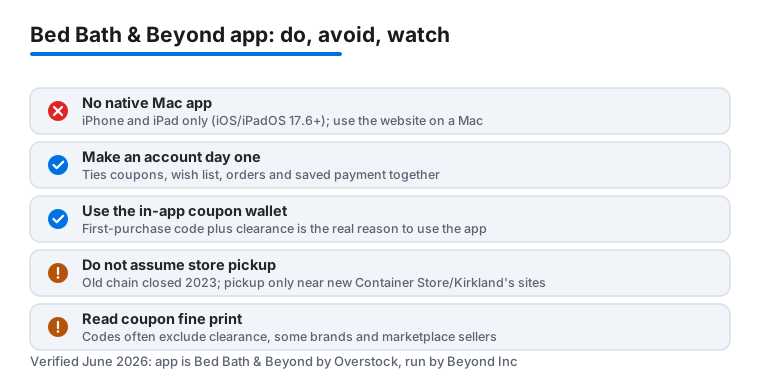
The second is store pickup, and this is where I have to correct the older advice. The original big box Bed Bath & Beyond chain closed in 2023. The brand is only now returning to physical retail in 2026 through co branded Container Store locations, converted Kirkland's stores, and a handful of new formats, with a goal of a few hundred stores over the next couple of years. That means buy online, pick up in store may or may not exist near you yet, depending on whether one of these new locations has opened in your area. Do not assume same day pickup the way you could a few years ago. Check the store locator in the app for your zip first.
Search can also drift. A plain query works well, but get too narrow on workspace terms and the results wander into loosely related home goods. Inventory moves fast during the clearance events that make the app worth using, so a lamp in your wish list can sell out before you act. Shipping costs and timelines vary by item, and some listings ship from third parties with slower delivery. Coupons, while real, often exclude clearance, specific brands, or marketplace sellers, so read the fine print first. On privacy, this is a retail app that wants notifications, location, and your payment details, so grant location only while using the app and skip marketing emails if you would rather not be tracked. None of these are dealbreakers, but they are worth knowing before you build a setup around the app.
Good alternatives worth comparing
Bed Bath & Beyond is one of several apps I keep on hand for kitting out a desk, and the right pick depends on what you are after. For furniture and bigger storage pieces, a dedicated home retailer app often has deeper stock and clearer assembly details. For cheap organizers and cable bits where price beats brand, a value marketplace can undercut almost everyone, and I broke down one of those in our look at Temu on the Mac. If your workspace refresh is as much about looks as function, pairing your gear with the right aesthetic helps, and our guide on matching your Mac with Fashion Nova finds is a fun place to start.
For the full rundown of shopping apps, browse our best shopping and fashion apps for Mac roundup, or step up to the wider Shopping & Fashion hub to see every store app we have tested. Just remember the same caveat applies to most of them: a lot of these so called Mac shopping apps are really iPhone and iPad apps with a website you use on the desktop. Trying two or three side by side, then buying from whichever has the better coupon that week, is how I ended up with a desk I actually like.
FAQ
Is there a real Bed Bath & Beyond app for Mac?
No. There is no native Mac app. The Bed Bath & Beyond app is an iPhone and iPad app, published by Beyond Inc, the company that used to be Overstock, which is why the listing reads Bed Bath & Beyond by Overstock. On an iMac or MacBook you shop the website at bedbathandbeyond.com in Safari, where your account and cart sync from the phone or iPad. You might see the iPad app offered on an Apple Silicon Mac, but it is not built for the desktop and I would not rely on it.
Does the app run on an iPad as well as an iPhone?
Yes. It is a universal app for iPhone and iPad and needs iOS 17.6 or iPadOS 17.6 or later as of mid 2026. The iPad is a good middle ground: a bigger screen than the phone, and it runs the actual app rather than just the website. The cart and account sync across both.
Do the in app coupons actually save money on workspace gear?
Yes, the coupons are the main reason to use the app. There is usually a first purchase coupon for shopping in the app, and I stacked percentage off codes on clearance for risers, bins, and lamps more often than not. Read the fine print, since codes commonly exclude clearance items, certain brands, and marketplace sellers. If you plan to shop there regularly, a Welcome Rewards+ or Beyond+ membership for free shipping and points back can be worth the annual fee.
Can I pick up an order the same day instead of waiting on shipping?
Maybe, but do not count on it the way you could before 2023. The original store chain closed, and Bed Bath & Beyond is only returning to physical retail in 2026 through co branded Container Store locations, converted Kirkland's stores, and new formats. Check the store locator in the app for your zip code first, because in store pickup only works if one of these locations has opened near you.
Does the cart sync between my iMac and my iPhone?
It does, as long as you are signed in to the same account on both. I planned a desk setup using the website on the iMac for the bigger screen, then opened the app on my iPhone and the same cart was waiting so I could finish checkout with Face ID. Just note that some app only coupons may not show up identically on the website, so the app is usually where you want to pay.