
Playing Mortal Kombat on Your iPhone or iPad: A Hands-On Guide
If you searched for Mortal Kombat on a Mac or iMac, here is the part nobody says clearly: there is no Apple app for it on macOS. Warner Bros never shipped one, and Mortal Kombat 1, the current console and PC game, has no native Mac build either. What does exist on Apple hardware is one specific title: Mortal Kombat, usually called Mortal Kombat Mobile, and it runs on iPhone and iPad only. We spent a couple of weeks with the current build on an iPhone and an iPad to see how it actually holds up, and the short version is that it is a real, free download that can be fun if you go in knowing what it is and what it will try to sell you. This guide covers the honest install, the settings worth changing, and the spots where you will want to keep your wallet closed.
What the Apple version actually is
Let me clear up the confusion first, because it trips up a lot of people. The game on the App Store is published by Warner Bros and listed simply as Mortal Kombat. It requires iOS 12.0 or later on iPhone and iPadOS 12.0 or later on iPad. As of the build we tested, it sat at version 7.1.0, last updated on January 28, 2026, so it is still actively maintained years after launch. The download is free, but the install is not small: it runs around 1.93 GB before the in-game asset downloads pile on, so clear some space before you start.
This is not a port of the console fighting game. It is a 3v3 tag-style fighter built for touch, where you tap and swipe to attack, block, and trigger special moves rather than pulling off frame-perfect combos with a stick. The roster is the real draw. There are more than 150 fighters pulled from across the series, from the old arcade days through the New Era characters tied to Mortal Kombat 1, so if you have a favorite, odds are decent they are in here somewhere. You build a team, fight through tower events, and grind for better versions of characters over time.
If you genuinely want the full console Mortal Kombat 1 on a Mac, that is a different project entirely. There is no App Store route. People do it through Windows compatibility layers like CrossOver or a virtual machine such as Parallels, or by streaming from a console or PC they already own. Those methods work with effort, but they are not what this page is about, and none of them is an Apple app you download and trust to just run. For most people reading this, the iPhone or iPad game is the practical Apple option.
Installing it and getting set up right
The install itself is the easy part. Open the App Store on your iPhone or iPad, search for Mortal Kombat by Warner Bros, and tap Get. After the initial 1.93 GB download finishes, the first launch pulls down a chunk of additional fight assets, so stay on Wi-Fi for that step unless you want a surprise on your cellular bill. Plug into power for the first session too. That opening download plus the early load makes the device work, and an older iPhone or iPad will get warm.
The single most important thing to do early is link a WB Games Account. You do this from the in-game settings menu, and it matters for two reasons. First, it is how your progress gets backed up; without it, a lost or wiped device can take your whole roster with it. Second, linking currently hands you a batch of Dragon Krystals, the premium currency, as a one-time reward, and if you also link a console account like Mortal Kombat 1 or Mortal Kombat 11 you can pick up extra cosmetics such as announcer voices. We treat the account link as a required step, not an optional one.
One honest caveat on the cross-device promise: linking your account does carry your profile between your own iPhone and iPad, which is handy if you play on both. But event Energy does not travel the way you might hope. Each tower event uses its own Energy pool that is exclusive to that event and does not carry over to the next one, so do not expect a single shared meter following you around. Know that going in and you will not feel cheated when an event resets.
Settings and controls that actually matter
Out of the box the game is built for thumbs on glass, and for most players that is fine. A few choices still make sessions smoother. Here is what we leaned on:
- Controller support, with caveats. The iOS version does accept MFi and Bluetooth gamepads, so you can pair a controller and play. In practice the touch design is the priority, and not every screen maps cleanly to buttons, so it helps in some modes more than others. Try it, but do not expect the precise stick play you would get from the console game.
- Play on the bigger screen when you can. An iPad gives you more room for the swipe gestures that trigger specials, and we landed combos more reliably there than on a phone. If you own both, the iPad is the more comfortable place for longer sessions.
- Headphones for the hits. The game leans on its sound, from the announcer to the brutal finishers. Decent headphones or earbuds make a real difference, and on a phone speaker a lot of that punch gets lost.
- Turn off other downloads. Background app refresh and large iCloud or photo syncs competing for bandwidth were the most common reason we saw the game stall while loading a fight.
None of this is exotic. These are the settings people skip in a hurry and then wonder why the game feels off. Spend a few minutes in the early practice fights to get used to the swipe timing before you take on anything competitive, because it is its own rhythm and rushing in early cost us a string of losses.
The money side, and the limits to know
This is where you need clear eyes. Mortal Kombat is free to download and aggressively built around in-app purchases. The best characters, the diamond and gold tier fighters, come from packs you buy with Souls, the soft currency, and earning enough Souls without spending real money is slow going. You can watch up to five ad videos a day for five Souls each, which caps you at 25 Souls daily, and that is a long grind toward a single good pack. The game is designed so that the comfortable path runs through your credit card.
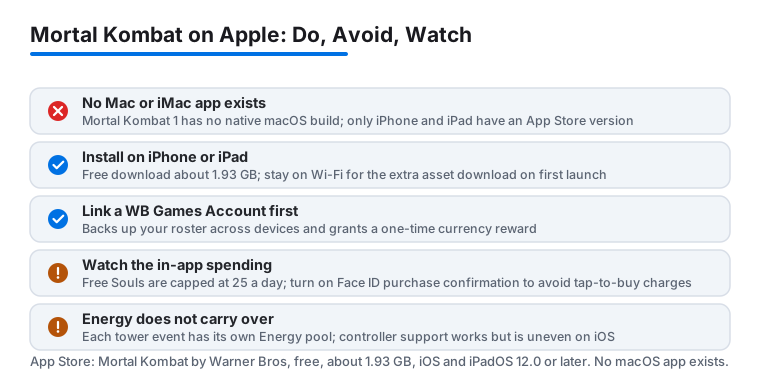
Treat the spending prompts with suspicion. The packs are tuned to look like a small step up at a tempting moment, and they add up quickly if you are not tracking them. If you share a device or hand it to a kid, turn on the App Store purchase controls and require Face ID or a password for every purchase, because tap-to-buy in a heated moment is exactly the trap these systems are built around. There is no refund for buyer's remorse on a digital pack.
Beyond cost, the practical limits are the same as most live mobile games. It needs a connection for most modes, so it is not a true offline game for a flight. Sustained play warms the device and drains the battery faster than you would expect, so this is a plugged-in or short-session activity rather than an all-afternoon one. And because it is a live game with frequent updates, the layout and event structure shift over time; a guide written today can drift as Warner Bros reworks menus and seasonal content. The core loop has held steady for years, but expect the surface to move.
If the mobile grind is not for you
If the energy timers and the constant nudge to buy Souls wear you down, that is a fair reaction, and there are other ways to get your fix on Apple hardware. If what you really wanted was console-grade Mortal Kombat, the route is to stream a copy you already own rather than chase a Mac app that does not exist. Our walkthrough on getting PS Remote Play working well on a MacBook covers the settings that keep input lag low, and a wired connection there beats Wi-Fi for a fighting game every time.
If you would rather have a fast, competitive game that runs cleanly without the heavy spending pressure, Brawl Stars is a lighter install with quick matches. For a broader look at what genuinely runs well on Apple desktops, our roundup of the best gaming apps for Mac is a good next stop, and you can browse everything we cover in the gaming section. Mortal Kombat Mobile is worth a look on your iPhone or iPad if you love the series and can keep the spending in check, but going in with the facts straight beats discovering them an hour and a few purchases later.
FAQ
Is there an official Mortal Kombat app for Mac or iMac?
No. There is no macOS app, and Mortal Kombat 1 has no native Mac build. The only Apple version is Mortal Kombat Mobile by Warner Bros, and it runs on iPhone and iPad only. Anything else on a Mac means streaming a console copy or using a Windows compatibility layer, not an App Store download.
What does the Apple App Store version cost?
The download is free. The money comes from in-app purchases. The strong fighters are bought with Souls, and earning Souls for free is slow; you can watch up to five ad videos a day for five Souls each, capping you at 25 daily. Turn on purchase confirmation so a quick tap does not become a charge.
Do I need a controller, or are touch controls fine?
Touch is the default and the game is built around it. The iOS version does accept MFi and Bluetooth controllers, but support is uneven across screens, so it is not the precise gamepad experience of the console game. An iPad's larger screen helped our swipe inputs more than a controller did.
Will my progress follow me between my iPhone and iPad?
Yes, if you link a WB Games Account in the settings, which also backs up your roster and grants a one-time currency reward. Note that event Energy is per-event and does not carry over, so do not expect a single shared meter across devices or between events.