
DoorDash on iPhone: Advanced Earning Tips for Real Dashers
The Dasher app on my iPhone is the tool that decides how much I take home on a Friday night, so I have spent a lot of hours learning where it helps and where it gets in the way. This is not a beginner walkthrough. It is the stuff I wish someone had told me after my first hundred deliveries: how to set the app up so it actually works for you, the two earning modes and when to switch, the features that move your hourly pay, the habits that filter out the bad orders, and the spots where DoorDash quietly costs you money. If you already know how to accept an order, this guide is written for you. One quick note up front on devices: the Dasher app is an iPhone app. Apple's App Store lists it as iPhone only, so there is no native iPad build; if you want a bigger screen, an iPad can run the iPhone app scaled up, but it is not a true tablet version. The thing you cannot do is dash from a Mac.
Getting the Dasher app dialed in on your iPhone
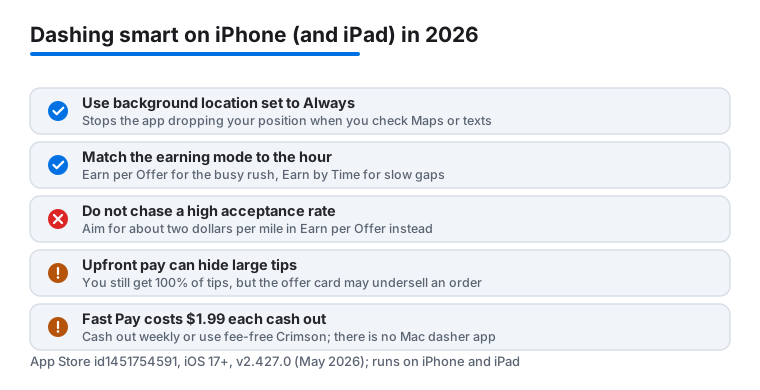
Most people install the Dasher app, sign in, and start driving. That works, but a few minutes in settings pays off every shift. The app needs iOS 17 or later in 2026, so if you are on an older iPhone, update first or the newer features will be missing. The first thing I do on a fresh phone is turn on background location and set it to Always, not While Using. If you leave it on While Using, the app can lose your position the moment you glance at Maps or answer a text, and that can cost you an offer. iOS will pop up a reminder every so often asking if you still want Always on; just confirm it and move on.
Next, open the iPhone Settings app, find Dasher, and let it send all notifications. The order alerts, the dash reminders, and the hotspot pings are how you react fast, and a muted app means missed money. While you are in there, turn on Critical Alerts if the app offers it, because a normal notification can get swallowed by a Focus mode.
The single biggest comfort upgrade for me was handing navigation to Apple Maps or Google Maps instead of the in app map. Open the Dasher app, tap the account icon, go into your settings, and pick your preferred navigation app so a tap drops you into turn by turn directions you trust. The in app navigation has improved since the 2025 redesign, but I still find the dedicated maps faster to reroute around traffic. I keep my iPhone on a vent mount with a MagSafe charger, because the Dasher app plus constant GPS drains a battery in roughly two hours. One privacy note worth saying plainly: Always location means DoorDash can see where you are whenever the app is running. That is the trade for getting offers routed to you, so close or sign out of the app when your shift ends.
Earn per Offer or Earn by Time, and when to switch
This is the setting that changed my pay the most, and a lot of drivers never touch it. The Dasher app gives you two modes, and you pick before you start a dash. They behave very differently.
Earn per Offer is the classic model. DoorDash shows you a pay figure for each delivery before you accept, and you can decline as many as you want with no penalty to this mode. This is where you cherry pick. On a busy Friday dinner rush, when orders come in back to back, I run Earn per Offer and skip anything that does not clear my threshold. A driver who knows their area can beat the guaranteed hourly rate by being picky.
Earn by Time pays you a guaranteed active hourly rate for the time you spend actively handling deliveries, plus one hundred percent of customer tips. The catch is in the fine print: in Earn by Time you can only decline or unassign one offer per hour without it counting against you. So you give up the cherry picking. Where this mode earns its keep is the dead afternoon. If it is a slow Tuesday and you are sitting twenty minutes between orders, Earn per Offer pays you nothing for that gap, while Earn by Time keeps the clock running.
My habit now is to start the dinner rush in Earn per Offer, then if the rush dies and the gaps get long, end the dash and restart in Earn by Time to lock in a steadier rate. You cannot flip modes mid dash, so plan the switch around a break. Read the active hourly rate the app quotes for your zone first, because it varies a lot by market and time of day.
The features that actually move your earnings
After a few hundred dashes, these are the parts of the app I lean on to push my hourly pay up:
- Dash Along the Way. Toggle this on before you head home and the app feeds you orders that point toward a destination you set, so your last run of the night is not a dead drive. It is also tied to zone selection now, so you can pick a zone within about a one hour commute and let it route you there while you earn.
- The hotspot map. Those red zones show where demand is climbing. I sit on the edge of one rather than dead center, so I am first in line for the next batch without circling for parking.
- Peak Pay. The app shows a dollar bump on the map during busy windows. Stacking a Peak Pay window with a hotspot is where the good nights come from. Peak Pay is a flat add to each delivery in that window, so it helps short cheap orders the most.
- Dasher Rewards. This replaced the old Top Dasher program in the US. It runs on rolling tiers, Silver, Gold, and Platinum, instead of the old monthly reset. Higher tiers can unlock perks like priority on high paying orders and the ability to dash anytime without scheduling. Your acceptance and completion rates over your last hundred orders feed your tier, and the app shows you exactly where you stand.
- The earnings tab. Check it between orders to see your real per hour rate, not just the total. It is the honest scoreboard.
None of these are hidden, but most drivers never combine them. Used together they are the difference between a flat night and a strong one.
If you chased Top Dasher in past years, do not go looking for it in the menu. It is gone in the US, and Dasher Rewards is what you are working toward now.
Practical tips from real shifts
A handful of habits did more for my take home than any single feature. First, I read the full offer card before I tap accept. The app shows the guaranteed pay and the total mileage, and my rule is simple: I want at least two dollars per mile, and I ignore the rest. That one filter raised my hourly pay more than anything else I tried. Just remember that in Earn by Time mode this rule does not apply the same way, since declines are limited there.
Second, I learned to decline politely and fast in Earn per Offer. A low offer that you sit and stare at is a low offer that blocks the next good one from reaching your screen. Tap no and keep moving. Third, I dash the dinner rush, not the dead afternoon. The app will let you schedule a dash days ahead, and the 5 pm to 9 pm window in my area pays close to double the lunch lull.
Fourth, I cash out with Fast Pay maybe once a week, not every day. Fast Pay costs $1.99 per transfer in the US, and that fee adds up fast if you tap it after every shift. You need a debit card, not a prepaid card, linked to your account to use it. DoorDash also pushes a banking account called Crimson that offers fee free instant cash out inside the app; read the account terms before you switch, but it is the way to skip the $1.99 if instant pay matters to you. Weekly direct deposit is still free and lands in a couple of days. Finally, I keep a phone charger and a thermal bag in reach, since a dead battery or a cold order tanks both your offers and your rating.
The limits and downsides to know
The Dasher app is good, but it is not your friend, and a few things genuinely frustrate me. The biggest is how it handles large tips. DoorDash shows a guaranteed amount up front, and on orders with an unusually high tip it sometimes shows only part of it, then posts the rest after you deliver. The company says you still get one hundred percent of every customer tip, and that is true, but it means the offer card can undersell a strong order and nudge you to decline something that would have paid well. New York's attorney general reached a settlement with DoorDash over older tip practices, and the upfront pay model is the result, so this masking is a known, deliberate thing. You learn to read the area and the restaurant rather than trusting the number alone. Generous neighborhoods and certain restaurants tip well even when the card looks thin.
Battery drain is the other constant. Running the Dasher app, GPS, and a navigation app at once will cook an iPhone, so plan on charging the entire shift. The app can also be slow to load offers in a weak signal pocket, and a frozen screen at a red light has cost me an order more than once; force quitting and reopening usually clears it, but you lose seconds you may not have.
Now a note on devices, since people ask. The Dasher app is published as an iPhone app, and the App Store lists it as iPhone only, so there is no dedicated iPad version. An iPad can run the iPhone app scaled up if you want a bigger screen mounted in the car, but it will not look or behave like a real tablet app. What does not exist at all is a Mac app for dashing. On a Mac you can only sign into the website to review your pay history, check your ratings, or handle a support issue. Treat the desktop as your back office, not your driving tool, and keep a phone for the road.
Apps worth pairing with DoorDash
DoorDash rarely lives alone on a serious driver's phone. The most useful companion for me is a mileage tracker that runs in the background and logs every drive for tax time, because the app does not hand you a clean deduction report. A dedicated tracker quietly saved me real money at tax season, and the IRS standard mileage rate is worth more than most people expect once you total a full year of dashing. I also keep a fuel rewards app open, since gas is the single biggest cost eating into every delivery dollar.
It is also worth knowing how DoorDash compares to the other gig platforms before you commit your whole week to one. If you want a side by side look at the same kind of earnings strategy, our pro tips for the Dasher app dig deeper into the order flow, and drivers chasing efficient routes should read our guide to Spark Driver apps and the best routes to see how another platform handles the same problem. For the full toolkit, browse our best business and jobs apps for iPhone roundup, or step up to the wider Business and Jobs hub to see every app we cover for working on the go.
FAQ
Can I run DoorDash and dash from my iPad or Mac?
The Dasher app is an iPhone app, and the App Store lists it as iPhone only, so there is no native iPad version. An iPad can run the iPhone app scaled up if you want a larger screen, but it is not a true tablet build. There is no Mac app for driving at all. On a Mac you are limited to the website, where you can check your earnings, review your ratings, and contact support. Think of the desktop as your back office and keep a phone for the road.
Why does my upfront pay sometimes look lower than what I earn?
DoorDash shows a guaranteed amount before you accept, and on orders with a large customer tip it sometimes shows only part of the tip, then posts the rest after you deliver. You still receive one hundred percent of the tip, but the offer card can undersell a strong order. I read the restaurant and neighborhood, not just the number, before I decline.
Is Top Dasher still a thing in 2026?
Not in the US. DoorDash replaced Top Dasher with the Dasher Rewards program, which uses rolling Silver, Gold, and Platinum tiers based on your recent performance instead of a monthly reset. Higher tiers can unlock perks like priority on better orders and dashing anytime, so that is the program to work toward now.
How do I keep my iPhone from dying during a long shift?
Set location to Always so the app stops restarting, mount the phone, and keep it on a charger the whole time. Running the Dasher app, GPS, and a navigation app together drains a battery fast, so a vent mount with a MagSafe or cable charger is the single best accessory for full shifts.