
Best News & Books Apps for Apple Devices (2026)
A great reading app fades into the background and just lets you turn the page, while a good news app keeps you informed without dragging you into a doomscroll. We spent weeks living inside these on an iPhone, an 11 inch iPad Pro and a Mac, reading in bed, catching headlines over coffee and borrowing library books for free. Below are the picks we actually kept, with honest notes on how each one feels day to day. For more browse the news and books hub, and if you read to learn, our roundup of the best education apps for iPad pairs nicely.
1. Kindle
The library that follows you everywhere. Whatever you buy from Amazon syncs your page, notes and highlights across iPhone, iPad and Mac, so you read a chapter on the bus and resume on the couch. In our testing the typography and warmth controls made long sessions genuinely comfortable. The app is free, you just pay per book or subscribe to Kindle Unlimited.
2. Apple Books
If you live in the Apple world, Books is the natural home for ebooks and audiobooks together. We loved how the page turns feel buttery on iPad and how reading goals quietly nudge you back. It is free and built in, with a clean store and no ads. The standout detail is how it remembers your spot across every Apple device automatically.
3. Goodreads
Less a reader and more the social layer around your reading life. We used it to track what we finished, set a yearly challenge and steal recommendations from friends with good taste. The app is free, owned by Amazon, and admittedly a little dated to look at. Still, nothing else matches its sheer depth of reviews when you are deciding whether a hyped novel is actually worth starting.
4. Libby
The app that quietly saves you the most money. Link a library card and Libby lets you borrow ebooks and audiobooks for free, sending them to the app or to Kindle. We were amazed how big the catalog gets once you join a couple of library systems. It is completely free, bar the occasional hold queue. On iPad the shelf view makes browsing feel like a real branch.
5. Fox News
Whatever your politics, the Fox News app is a fast, well organised way to follow breaking stories and live video. We found alerts arrived promptly and the layout made it easy to jump between text and clips on iPhone. It is free with ads, and a subscription unlocks Fox Nation extras. Set your notification preferences carefully or the breaking news pings can get noisy during a busy news week.
6. Wattpad
A bottomless well of stories written by everyday people, from fan fiction to original romance and thrillers. We treated it like a streaming service for reading, following ongoing tales chapter by chapter. The app is free with ads, and Premium removes them while unlocking bonus content. On the iPad the comfortable reading view and dark mode made it easy to lose an evening to a cliffhanger.
7. Webtoon
If your reading leans visual, Webtoon delivers vertically scrolling comics built for a phone screen. We swiped through romance, action and slice of life series and the format clicks with how you already hold an iPhone. It is free with a daily pass, and you buy coins to read ahead. The art looks crisp everywhere, though the endless scroll feels made for touch over a Mac trackpad.
8. Bible
The hugely popular YouVersion Bible app offers dozens of translations, reading plans and a daily verse, all for free with no ads. We appreciated how plans break big goals into small daily readings, and how easily you can switch versions side by side. It syncs your highlights across iPhone, iPad and the web. The audio narration is a quiet highlight, well suited to listening during a commute or a slow morning.
9. Bible apps
Beyond the big name, the wider category of Bible apps covers study tools, devotionals and denomination specific editions. We tried several and found the best ones add commentary, original language notes and offline reading worth having. Most are free with optional purchases for premium study packs. If the mainstream app feels too broad, a focused study app on the larger iPad screen makes cross referencing passages genuinely pleasant.
10. news apps
Rather than commit to one outlet, a good general news app like Apple News pulls many sources into one feed you tune to your interests. We liked having world, local and niche topics together instead of bouncing between sites. Many are free, with tiers such as Apple News Plus adding full magazines. See the wider news and books hub for more picks.
11. ebook apps
If you are not locked into one store, the broader world of ebook apps lets you read from many sources, including free public domain classics. We tested a few and the best handle EPUB files, adjust fonts and sync your spot across devices. Most are free with optional upgrades. Pairing a flexible reader with library borrowing is the cheapest way we found to stay stocked.
12. eBook reader apps
For people who care about the reading experience itself, dedicated eBook reader apps focus on typography, margins and page feel over a storefront. We found the right one turns an iPad into something close to paper, with warm tones for night reading. Many are free, with paid versions adding fine grained controls. If you take a lot of notes, our best productivity apps for iPad guide pairs well.
How to choose news and books apps for iPhone and iPad
News and reading are two different jobs, and the apps that do each one well rarely overlap. A news app should keep you informed in short, calm sessions, then let you put the phone down. A reading app should disappear so the book is all that is left. Before you install a dozen icons, it helps to decide what you actually want from your screen, because the choice between free, subscription and library borrowing changes a lot about what you end up paying.
The iPhone and the iPad pull in slightly different directions here, and it is worth matching the app to the device. The phone is where short news sessions and audiobooks fit naturally, since you read it in line, on a walk or for five minutes before bed. The iPad, with its larger screen, is the better place to sink into a long book, read two columns of a magazine side by side, or keep a study app open with notes. A few of these apps run on Mac too, which is handy if you want to pick up the same chapter at a desk, though reading a novel on a laptop is rarely the part anyone enjoys most.
News: free to install, but watch the paywall
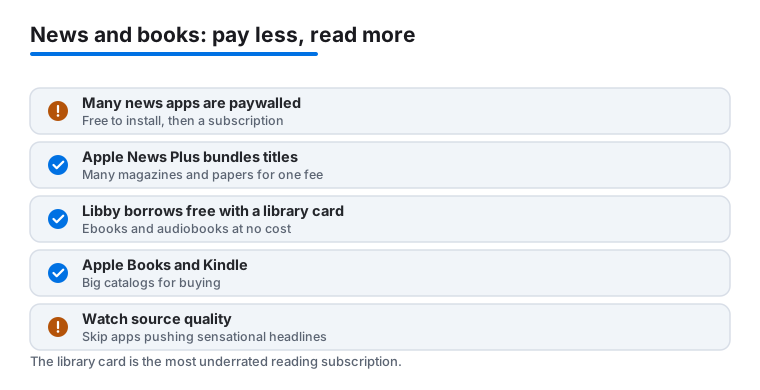
Most news apps are free to download, and that is where the simple part ends. Many lock the majority of their articles behind a subscription, while others use a metered paywall that gives you a handful of free reads each month before asking you to pay. Neither approach is dishonest, but it is worth knowing which one you are dealing with before you build a daily habit around an app you will eventually be charged for.
- Apple News is the built in aggregator on iPhone and iPad. It pulls headlines from many outlets into one feed you can tune by topic. A good amount is free to read, and you can mute subjects you would rather not see.
- Apple News Plus is the paid tier. For one monthly fee it bundles hundreds of magazines and some newspapers, so if you already read several titles it can cost less than subscribing to each one separately. If you only follow one outlet, a single subscription to that outlet is usually the better deal.
- Individual outlet apps from a specific newspaper or broadcaster give you that source in full, often with live video and breaking alerts. The trade off is that each one is its own subscription, and the costs add up quickly if you collect several.
Whatever you choose, be mindful of source quality. Some apps and feeds are built to push sensational or misleading headlines because outrage keeps you scrolling, and a steady diet of that leaves you more agitated than informed. A calmer approach is to favor outlets with a clear correction policy and named reporters, follow only the topics you care about, and turn breaking news alerts down to a trickle so the app informs you on your schedule rather than interrupting your day. It also helps to be honest with yourself about how a given app makes you feel after ten minutes. If you put the phone down tense and none the wiser, that is a sign the app is feeding you heat rather than light, and no notification setting will fix that. The free price of an app is not the same as a low cost to your attention.
Reading: owning, borrowing, and the free option people miss
For books you have three broad paths, and most readers end up mixing them. You can own titles through a store, borrow them free from your library, or read public domain classics that cost nothing at all.
- Buying and owning. Kindle and Apple Books are both free to install and only cost you when you buy a title. Kindle ties your purchases to your Amazon account and syncs your page, notes and highlights across iPhone, iPad and Mac. Apple Books keeps ebooks and audiobooks together inside the Apple world and remembers your spot across devices automatically. Either is a solid home library.
- Borrowing for free. This is the tip too many people overlook. With Libby and a library card you borrow ebooks and audiobooks for free, and you can send borrowed ebooks straight to your Kindle app. Join a couple of library systems and the catalog gets surprisingly deep. The only cost is patience, since popular titles sometimes have a hold queue.
- Reading classics for nothing. A flexible ebook reader that handles EPUB files lets you load free public domain books and adjust the type to your eyes. Pair that with library borrowing and you can keep a full shelf without spending anything.
If you are deciding between Kindle and Apple Books, the practical question is which account you already live in. People deep in the Amazon world tend to be happiest with Kindle, partly because Libby can deliver borrowed books straight into it. People who own an iPhone, iPad and Mac and want one tidy place for ebooks and audiobooks together often prefer Apple Books. You do not have to pick just one. It is perfectly normal to buy a series in Kindle, read free classics in another reader, and borrow everything else through the library, all on the same device.
A word on subscriptions and audiobooks
Reading subscriptions are optional extras, not requirements. Kindle Unlimited and Apple News Plus only make sense if you read a high volume each month. If you read a few books a year, owning the ones you love and borrowing the rest through Libby is almost always cheaper.
Audiobooks deserve their own honest note. If you buy them through Audible, the files are usually tied to your account with DRM, which means they live inside that app rather than as files you freely move around. That is fine if you plan to stay in the Audible ecosystem, but it is worth knowing before you build a large library there. Audiobooks borrowed through Libby, by contrast, simply expire at the end of the loan and cost nothing.
Putting it together
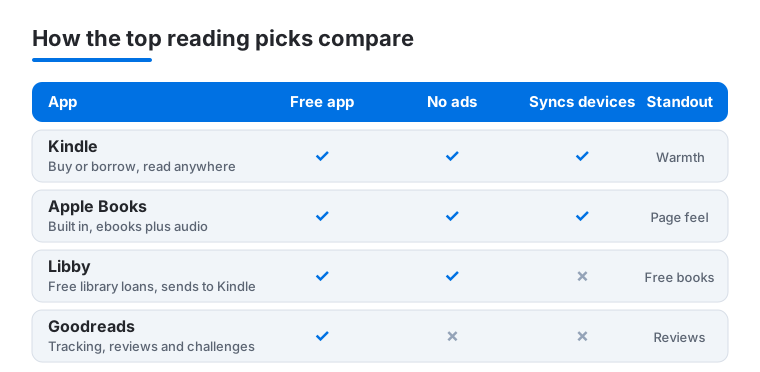
For most people a calm setup looks like this: one news app you trust with alerts kept low, one main reader for books you buy, and Libby running alongside so there is always something free waiting. If you track what you read or like a recommendation from people you trust, a tracking app such as Goodreads sits nicely on top without getting in the way of the actual reading. That combination keeps you informed without the doomscroll, gives you a comfortable place to read, and quietly saves you money every single month. Start with the free pieces first, add a subscription only when you can point to the exact thing it unlocks, and you will rarely feel you are paying for screen time you do not use. The comparison below shows how our top four reading picks line up on cost, ads, syncing and what each one does best.
Frequently asked questions
What is the best free reading app for iPhone and iPad?
For borrowing, Libby is the best value because it pulls free ebooks and audiobooks straight from your local library. For owning, both Kindle and Apple Books are free to install and only cost you when you buy a title. We usually run Libby alongside one main reader so there is always something new to read at no cost.
Can I read the same book across iPhone, iPad and Mac?
Yes. Kindle and Apple Books both sync your current page, highlights and notes across every device tied to your account, so you can start on a phone at lunch and continue on a Mac at home. Just sign in with the same account everywhere and the apps keep your place for you automatically.
Do I need a subscription to read ebooks?
Not at all. The reading apps themselves are free, and you can fill them with free library loans through Libby or public domain classics through most ebook apps. Subscriptions like Kindle Unlimited or Apple News Plus are optional extras that make sense only if you read a high volume each month.
Which news app is best if I want to avoid doomscrolling?
A curated app like Apple News lets you mute topics and follow only the subjects you care about, which helps a lot. We also suggest turning breaking news alerts down to a trickle so the app informs you on your schedule rather than interrupting your day every few minutes.
Is Apple News Plus worth it over individual outlet subscriptions?
It depends on how widely you read. Apple News Plus bundles hundreds of magazines and some newspapers for one monthly fee, so if you regularly read several titles it can cost less than subscribing to each separately. If you only follow one outlet, a single subscription to that source is usually the better value.
Why are my Audible audiobooks locked to one app?
Audiobooks bought through Audible are usually tied to your account with DRM, so they play inside the Audible app rather than as free standing files you move between players. That is fine if you plan to stay with Audible. If you want files with fewer restrictions, audiobooks borrowed free through Libby simply expire at the end of the loan instead.